BKS mBroker Slovenija
An application for trading in domestic and foreign capital markets
BKS Bank AG · si.bksbank.mbroker



UpdatedSep 4, 2023
PublishedJul 29, 2021
Packagesi.bksbank.mbroker
MD598f68fe2a69e1e36a7b5793590bbaef6
SHA1 (signer)58:0B:95:63:1D:E2:DF:0A:A1:9B:04:8E:AE:4A:27:28:B6:4F:45:6F
Signed byCN=mobile development, OU=Asset management, O=BKS Bank AG, L=Ljubljana, ST=Slovenia, C=SI
Architecturesx86, x86-64, armeabi-v7a, arm64-v8a
Malware scanTRUSTED
Contact[email protected]
Privacy policyView
What's new
Podpora za Android 13, popravek na formi denar.
Description
The application gives the user personalized and direct access to capital markets using a mobile device, where simple menu navigation enables the use of the following features:
- An overview of the client's homepage with a portfolio yield
- Detailed review of the client's portfolio
- Review of live exchange rates on the Ljubljana Stock Exchange
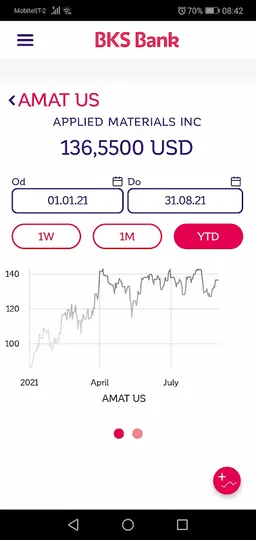
- Review of closing courses of foreign financial instruments
- Submission of domestic and foreign stock orders (live order submission and monitoring)
- Submission of money orders (transfer to TRR, change of currencies)
- Overview of executed transactions (financial instruments, cash)
- Review of documents received (transaction accounts, notices of corporate actions, acknowledgment of receipt of orders, quarterly and annual reports, bank notices)
- Capital Markets News Review (Domestic, Foreign, Own)
- Contact details
For more information, visit our website at: https://www.bksbank.si/mbroker
Important: To get started using BKS mBroker, activate the application in BKS MyBroker or BKS mBank, visit your nearest BKS Bank branch or contact your advisor.
- An overview of the client's homepage with a portfolio yield
- Detailed review of the client's portfolio
- Review of live exchange rates on the Ljubljana Stock Exchange
- Review of closing courses of foreign financial instruments
- Submission of domestic and foreign stock orders (live order submission and monitoring)
- Submission of money orders (transfer to TRR, change of currencies)
- Overview of executed transactions (financial instruments, cash)
- Review of documents received (transaction accounts, notices of corporate actions, acknowledgment of receipt of orders, quarterly and annual reports, bank notices)
- Capital Markets News Review (Domestic, Foreign, Own)
- Contact details
For more information, visit our website at: https://www.bksbank.si/mbroker
Important: To get started using BKS mBroker, activate the application in BKS MyBroker or BKS mBank, visit your nearest BKS Bank branch or contact your advisor.
Required features
- Faketouch android.hardware.faketouch
Permissions (7)
BKS mBroker Slovenija requests the following Android permissions:
- Access Network State android.permission.ACCESS_NETWORK_STATE
- Internet android.permission.INTERNET
- Read External Storage android.permission.READ_EXTERNAL_STORAGE
- Use Biometric android.permission.USE_BIOMETRIC
- Use Fingerprint android.permission.USE_FINGERPRINT
- Write External Storage android.permission.WRITE_EXTERNAL_STORAGE
- Si Bksbank Mbroker Dynamic Receiver Not Exported Permission si.bksbank.mbroker.DYNAMIC_RECEIVER_NOT_EXPORTED_PERMISSION