Timebox Timer
Simple to use, extremely functional and highly legible timer
Timebox App · de.kempmobil.timer



UpdatedJun 12, 2024
PublishedMay 7, 2021
Packagede.kempmobil.timer
MD58b113f7bcbf6975003412910cf49aba8
SHA1 (signer)91:ED:0B:A4:0E:2F:ED:FA:B6:CF:59:4C:DE:81:52:C3:97:96:8F:CE
Signed byCN=Ulrich Kemp, OU=Development, O=kempmobil, L=Bonn, ST=NRW, C=DE
Malware scanTRUSTED
Websitehttps://timebox-app.com/
Contact[email protected]
Privacy policyView
What's new
Added options for haptic and audio feedback when dragging the timer.
Description
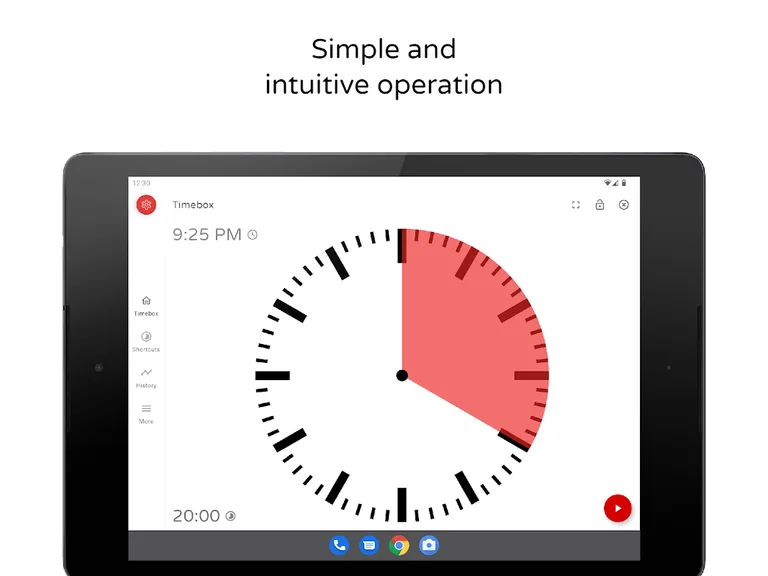
Timebox Timer allows you to start a timer in an instant. Quickly launch the timer with a simple swipe. The clear and simple presentation helps you to keep the remaining time in view.
For Business
Keep an eye on times in meetings, increase productivity and stay focused; ideal also for Scrum Masters.
For Education/Learning
Children can more easily recognize and understand the passage of time when using Timebox Timer.
At Home
Use Timebox Timer at home for everyday work such as cooking, learning or sports. Ideal also for board games.
We keep this app free by showing ads. For a small fee, you can hide the ads on all of your devices.
Timebox provides:
✓ Times from one second to up to three hours
✓ Optimized also for tablets and large displays
✓ Different watch faces
✓ Stays on as long as the app is in foreground
✓ Shortcuts for faster access
✓ Works great as a pomodoro timer
✓ Many other customization options
For Business
Keep an eye on times in meetings, increase productivity and stay focused; ideal also for Scrum Masters.
For Education/Learning
Children can more easily recognize and understand the passage of time when using Timebox Timer.
At Home
Use Timebox Timer at home for everyday work such as cooking, learning or sports. Ideal also for board games.
We keep this app free by showing ads. For a small fee, you can hide the ads on all of your devices.
Timebox provides:
✓ Times from one second to up to three hours
✓ Optimized also for tablets and large displays
✓ Different watch faces
✓ Stays on as long as the app is in foreground
✓ Shortcuts for faster access
✓ Works great as a pomodoro timer
✓ Many other customization options
Required features
- Faketouch android.hardware.faketouch
Permissions (19)
Timebox Timer requests the following Android permissions:
- Access Adservices Ad Id android.permission.ACCESS_ADSERVICES_AD_ID
- Access Adservices Attribution android.permission.ACCESS_ADSERVICES_ATTRIBUTION
- Access Adservices Topics android.permission.ACCESS_ADSERVICES_TOPICS
- Access Network State android.permission.ACCESS_NETWORK_STATE
- Access Notification Policy android.permission.ACCESS_NOTIFICATION_POLICY
- Flashlight android.permission.FLASHLIGHT
- Foreground Service android.permission.FOREGROUND_SERVICE
- Foreground Service System Exempted android.permission.FOREGROUND_SERVICE_SYSTEM_EXEMPTED
- Internet android.permission.INTERNET
- Post Notifications android.permission.POST_NOTIFICATIONS
- Read External Storage android.permission.READ_EXTERNAL_STORAGE
- Read Media Audio android.permission.READ_MEDIA_AUDIO
- Use Exact Alarm android.permission.USE_EXACT_ALARM
- Use Full Screen Intent android.permission.USE_FULL_SCREEN_INTENT
- Vibrate android.permission.VIBRATE
- Wake Lock android.permission.WAKE_LOCK
- Com Android Vending Billing com.android.vending.BILLING
- Gms Permission Ad Id com.google.android.gms.permission.AD_ID
- De Kempmobil Timer Dynamic Receiver Not Exported Permission de.kempmobil.timer.DYNAMIC_RECEIVER_NOT_EXPORTED_PERMISSION