Thermostat
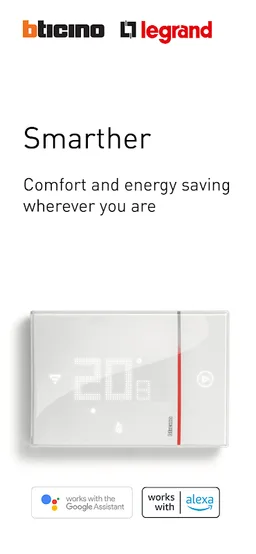
Application to configure and control your connected thermostat Smarther
BTicino spa · it.bticino.thermostat


UpdatedJul 15, 2025
PublishedJun 12, 2023
Packageit.bticino.thermostat
MD5ded6ff4430e33467dfb6e9bc9bc0dc5d
SHA1 (signer)BC:58:E9:1E:85:F2:8B:05:51:0B:D8:A6:44:40:86:EF:2D:AC:24:01
Signed byCN="Emanuele Di Emanuele, O=Bticino"
Architecturesx86, x86-64, armeabi-v7a, arm64-v8a
Malware scanTRUSTED
Websitehttp://www.bticino.com
Contact[email protected]
Privacy policyView
What's new
Serveral optimizations and bug fixing
Description
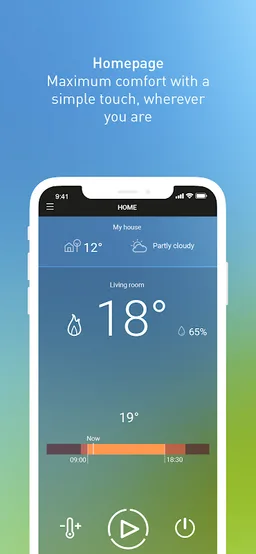
The "Thermostat" application allows you to control the temperature of your home with a simple gesture locally or remotely, from your smartphone
You want to heat your home only in the evening and in the morning before going to work? Are you coming back from vacation and want to restart the heating of your home a few hours before your arrival? The free application "Legrand Thermostat" allows you to adapt the heating management of your home to your lifestyle, create your weekly program, manage unexpected, and remotely control everything.
INSTALL THE THERMOSTAT APPLICATION
• 1/ Create your account
• 2 / Connect the thermostat to the Wi-Fi network of the house
• 3 / Choose the guided procedure to create your programs
THE BENEFITS OF THE LEGRAND THERMOSTAT APPLICATION
With this simple and intuitive app, you can:
• control your thermostat from your smartphone locally or remotely
• adjust the temperature setpoint whenever you want for a desired time. For example, when you are not at home, activate the frost protection mode.
• activate the "Boost" function to force the heating for 30, 60 or 90 minutes
• create your programs according to your lifestyle
• manage up to 4 thermostats in your home and other thermostats installed in other homes
• invite other inhabitants of the house to control your thermostat from their smartphone
When you leave your home, the connected Smarther thermostat detects that you are not at home, thanks to the geolocation function.
THE + OF LEGRAND THERMOSTAT APPLICATION:
When you leave your home, the connected Smarther thermostat detects that you are outside your Wi-fi coverage area, thanks to the geolocation function.
A notification informs you that you can change the current schedule. This avoids heating the house for nothing and saving energy.
You want to heat your home only in the evening and in the morning before going to work? Are you coming back from vacation and want to restart the heating of your home a few hours before your arrival? The free application "Legrand Thermostat" allows you to adapt the heating management of your home to your lifestyle, create your weekly program, manage unexpected, and remotely control everything.
INSTALL THE THERMOSTAT APPLICATION
• 1/ Create your account
• 2 / Connect the thermostat to the Wi-Fi network of the house
• 3 / Choose the guided procedure to create your programs
THE BENEFITS OF THE LEGRAND THERMOSTAT APPLICATION
With this simple and intuitive app, you can:
• control your thermostat from your smartphone locally or remotely
• adjust the temperature setpoint whenever you want for a desired time. For example, when you are not at home, activate the frost protection mode.
• activate the "Boost" function to force the heating for 30, 60 or 90 minutes
• create your programs according to your lifestyle
• manage up to 4 thermostats in your home and other thermostats installed in other homes
• invite other inhabitants of the house to control your thermostat from their smartphone
When you leave your home, the connected Smarther thermostat detects that you are not at home, thanks to the geolocation function.
THE + OF LEGRAND THERMOSTAT APPLICATION:
When you leave your home, the connected Smarther thermostat detects that you are outside your Wi-fi coverage area, thanks to the geolocation function.
A notification informs you that you can change the current schedule. This avoids heating the house for nothing and saving energy.
Required features
- Faketouch android.hardware.faketouch
- Location android.hardware.location
- Location Gps android.hardware.location.gps
- Location Network android.hardware.location.network
- Screen Portrait android.hardware.screen.portrait
- Wifi android.hardware.wifi
Permissions (26)
Thermostat requests the following Android permissions:
- Access Background Location android.permission.ACCESS_BACKGROUND_LOCATION
- Access Coarse Location android.permission.ACCESS_COARSE_LOCATION
- Access Fine Location android.permission.ACCESS_FINE_LOCATION
- Access Location Extra Commands android.permission.ACCESS_LOCATION_EXTRA_COMMANDS
- Access Network State android.permission.ACCESS_NETWORK_STATE
- Access Notification Policy android.permission.ACCESS_NOTIFICATION_POLICY
- Access Wifi State android.permission.ACCESS_WIFI_STATE
- Bind Notification Listener Service android.permission.BIND_NOTIFICATION_LISTENER_SERVICE
- Change Configuration android.permission.CHANGE_CONFIGURATION
- Change Network State android.permission.CHANGE_NETWORK_STATE
- Change Wifi Multicast State android.permission.CHANGE_WIFI_MULTICAST_STATE
- Change Wifi State android.permission.CHANGE_WIFI_STATE
- Internet android.permission.INTERNET
- Location Hardware android.permission.LOCATION_HARDWARE
- Post Notifications android.permission.POST_NOTIFICATIONS
- Read External Storage android.permission.READ_EXTERNAL_STORAGE
- Read Logs android.permission.READ_LOGS
- Read Phone State android.permission.READ_PHONE_STATE
- Receive Boot Completed android.permission.RECEIVE_BOOT_COMPLETED
- Request Ignore Battery Optimizations android.permission.REQUEST_IGNORE_BATTERY_OPTIMIZATIONS
- Wake Lock android.permission.WAKE_LOCK
- Write External Storage android.permission.WRITE_EXTERNAL_STORAGE
- Write Settings android.permission.WRITE_SETTINGS
- Write User Dictionary android.permission.WRITE_USER_DICTIONARY
- Com Android Alarm Permission Set Alarm com.android.alarm.permission.SET_ALARM
- C2dm Permission Receive com.google.android.c2dm.permission.RECEIVE