The Partner Patrol System
Lone Worker & Man Down, Patrol system, Attendance with shift management
Interconnective · cz.ttc.thepartner



UpdatedJun 4, 2024
PublishedJun 13, 2021
Packagecz.ttc.thepartner
MD556b13f45b2c7cb6ad8e8b883b1f73997
SHA1 (signer)ED:42:02:C8:F9:DF:94:22:82:84:50:3D:23:38:E9:D0:0F:66:93:8E
Signed byCN=Pavel Novak, OU=U80, O=TTC Telekomunikace, L=Prague, ST=Czech Republic, C=CZ
Architecturesx86, x86-64, armeabi-v7a, arm64-v8a
Malware scanTRUSTED
Contact[email protected]
Privacy policyView
Description
The desire by customers to receive frontline security activity information instantly, whenever and wherever they want, has changed the way Interconnective has approached the design of our new series of patrol solutions. Customers, if necessary, want to communicate directly with frontline officers as well as having photographic details and in some cases a real time video view of incidents.
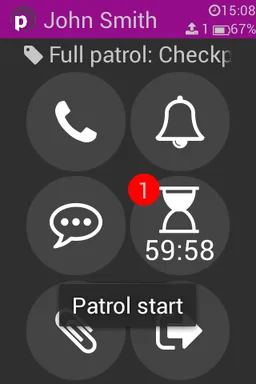
The Partner Online is the latest Patrol System to be introduced from The Partner Patrol range, designed to assist frontline security personnel. It is a flexible and adaptive proof of location and activity verification system which is designed to record the place, date and time of each visit undertaken by a security officer or cleaning/maintenance staff, as well as recording incidents and other verification activities in real time using an app on a ruggedised Android based smart phone and an online portal to view reports. The system uses NFC tags to provide proof of presence.
Patrol reports can be generated online, or automatically emailed to designated contacts as required.
Special permissions used by this app:
BIND_DEVICE_ADMIN - The application can become Device Admin to temporarily prevent accidental uninstallation. Only the dispatcher (with correct permissions) can choose whether the app is Device Admin.
SEND_SMS - This permission is used for sending loneworker emergency SMS.
This app uses the Device Administrator permission. If manager enables Device Admin this app can't be uninstalled until the manager disables Device Admin. There are no uses policies.
Accessibility Service
Because this app is an accessibility service, it can observe your actions, retrieve window content, and observe text that you type.
Application is used for higher productivity and safe work environment as a Lone worker protection system. For safer work we use Accessibility Services API to prevent leaving application to be sure, app will work on foreground in case of emergency.
To begin using Accessibility service The Partner:
- Navigate to Settings > Accessibility
- Locate and turn on The Partner
The Partner Online is the latest Patrol System to be introduced from The Partner Patrol range, designed to assist frontline security personnel. It is a flexible and adaptive proof of location and activity verification system which is designed to record the place, date and time of each visit undertaken by a security officer or cleaning/maintenance staff, as well as recording incidents and other verification activities in real time using an app on a ruggedised Android based smart phone and an online portal to view reports. The system uses NFC tags to provide proof of presence.
Patrol reports can be generated online, or automatically emailed to designated contacts as required.
Special permissions used by this app:
BIND_DEVICE_ADMIN - The application can become Device Admin to temporarily prevent accidental uninstallation. Only the dispatcher (with correct permissions) can choose whether the app is Device Admin.
SEND_SMS - This permission is used for sending loneworker emergency SMS.
This app uses the Device Administrator permission. If manager enables Device Admin this app can't be uninstalled until the manager disables Device Admin. There are no uses policies.
Accessibility Service
Because this app is an accessibility service, it can observe your actions, retrieve window content, and observe text that you type.
Application is used for higher productivity and safe work environment as a Lone worker protection system. For safer work we use Accessibility Services API to prevent leaving application to be sure, app will work on foreground in case of emergency.
To begin using Accessibility service The Partner:
- Navigate to Settings > Accessibility
- Locate and turn on The Partner
Required features
- Faketouch android.hardware.faketouch
- Screen Portrait android.hardware.screen.portrait
Permissions (35)
The Partner Patrol System requests the following Android permissions:
- Access Background Location android.permission.ACCESS_BACKGROUND_LOCATION
- Access Coarse Location android.permission.ACCESS_COARSE_LOCATION
- Access Fine Location android.permission.ACCESS_FINE_LOCATION
- Access Network State android.permission.ACCESS_NETWORK_STATE
- Access Notification Policy android.permission.ACCESS_NOTIFICATION_POLICY
- Access Wifi State android.permission.ACCESS_WIFI_STATE
- Bluetooth android.permission.BLUETOOTH
- Bluetooth Admin android.permission.BLUETOOTH_ADMIN
- Call Phone android.permission.CALL_PHONE
- Camera android.permission.CAMERA
- Change Network State android.permission.CHANGE_NETWORK_STATE
- Change Wifi State android.permission.CHANGE_WIFI_STATE
- Flashlight android.permission.FLASHLIGHT
- Foreground Service android.permission.FOREGROUND_SERVICE
- Get Tasks android.permission.GET_TASKS
- Internet android.permission.INTERNET
- Modify Audio Settings android.permission.MODIFY_AUDIO_SETTINGS
- Nfc android.permission.NFC
- Post Notifications android.permission.POST_NOTIFICATIONS
- Prevent Power Key android.permission.PREVENT_POWER_KEY
- Read External Storage android.permission.READ_EXTERNAL_STORAGE
- Read Phone State android.permission.READ_PHONE_STATE
- Receive Boot Completed android.permission.RECEIVE_BOOT_COMPLETED
- Record Audio android.permission.RECORD_AUDIO
- Schedule Exact Alarm android.permission.SCHEDULE_EXACT_ALARM
- Send Sms android.permission.SEND_SMS
- System Alert Window android.permission.SYSTEM_ALERT_WINDOW
- Vibrate android.permission.VIBRATE
- Wake Lock android.permission.WAKE_LOCK
- Write External Storage android.permission.WRITE_EXTERNAL_STORAGE
- Write Settings android.permission.WRITE_SETTINGS
- C2dm Permission Receive com.google.android.c2dm.permission.RECEIVE
- Finsky Permission Bind Get Install Referrer Service com.google.android.finsky.permission.BIND_GET_INSTALL_REFERRER_SERVICE
- Gms Permission Ad Id com.google.android.gms.permission.AD_ID
- Uk Co Thepartner Messenger Read Messenger Status uk.co.thepartner.messenger.READ_MESSENGER_STATUS