
Speed Indicator - Internet Speed - Monitor Network
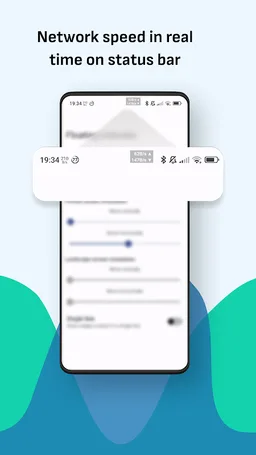
Monitor network speed in real time on status bar
Paget96 · com.paget96.netspeedindicator
UpdatedMay 19, 2025
PublishedApr 16, 2025
Packagecom.paget96.netspeedindicator
MD532f9d1b42cd838ccfc6cf8157fde9fd3
SHA1 (signer)61:ED:37:7E:85:D3:86:A8:DF:EE:6B:86:4B:D8:5B:0B:FA:A5:AF:81
Signed by[email protected], CN=Android, OU=Android, O=Android, L=Mountain View, ST=California, C=US
Malware scanUNKNOWN
Contact[email protected]
Privacy policyView
What's new
v1.7.6
- Removed redundant and deprecated code
- Updated shell methods and their functionality
- Updated dependencies
- Optimized in-app performances
- Removed redundant and deprecated code
- Updated shell methods and their functionality
- Updated dependencies
- Optimized in-app performances
Description
🏅 The best tool on the market
⏱️ The most accurate speed test
📊 Easy access to bandwidth speed and usage
🔃 Fully customizable speed indicator
🔃 NetSpeed Indicator is a convenient, small, and simple network tool with useful features that allows you to discover your download and upload speeds, check ping, analyze and get connected devices on Wi-Fi, speed test, and many more.
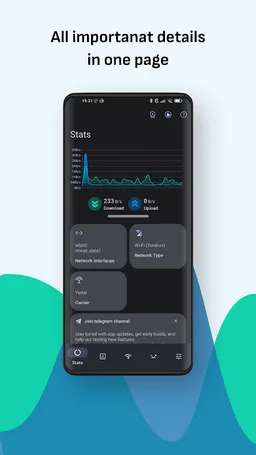
Check current Download/Upload speeds directly from your status bar, notification, or in-app itself, available in kbps, Mbps or KB/s, MB/s
Since Android doesn't show network connection statistics on screen, you are not able to see current internet bandwidth used for upload and download.
You can track the live network information for any kind of a network (2G, 3G, 4G, 5G, Wi-Fi)!
Net Speed indicator also contains other functions:
⭐ Speed test - The most accurate speed test (by ookla)
⭐ Check Today's and Monthly usage of Data and Wi-Fi usage for both sent and received bytes.
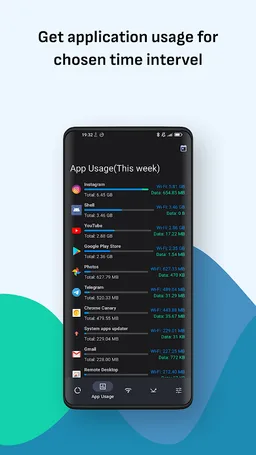
⭐ App stats - A place to check the app data and WiFi usage over a chosen period of time.
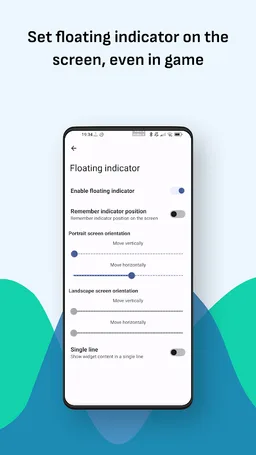
⭐ Floating widget - Floating bubble (also expandable on tap) showing the current Upload/Download speeds.
⭐ Wi-Fi Analyzer - Check more info about your and available Wi-Fi hotspots (SSID, BSSID, Signal strength, MAC, ID, frequency, and many more).
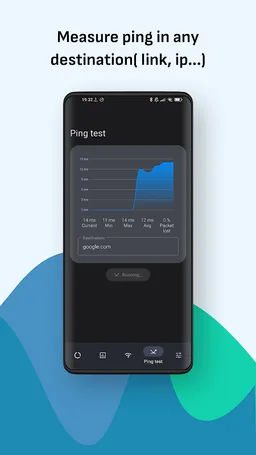
⭐ Ping test - Test PING on any destination(by default is google.com), and get min, max, and average ping, including packet loss.
⭐ Discover devices - Find all devices connected to your Wi-Fi, get info about them.
Available in-app subscription for ads removal:
- Disable ads for 24h (can be used every day for free, unlimited)
- Disable ads for 1 week
- Disable ads for 1 month
💁 I'm listening for suggestions from the users and trying to implement them as soon as possible. 90% of the suggestions are actually there. Check the links below for more.
If you have a suggestion, ideas, or anything else including reporting bugs, join the discussion group on this link:
https://t.me/Paget96_Projects
Thanks for supporting
⏱️ The most accurate speed test
📊 Easy access to bandwidth speed and usage
🔃 Fully customizable speed indicator
🔃 NetSpeed Indicator is a convenient, small, and simple network tool with useful features that allows you to discover your download and upload speeds, check ping, analyze and get connected devices on Wi-Fi, speed test, and many more.
Check current Download/Upload speeds directly from your status bar, notification, or in-app itself, available in kbps, Mbps or KB/s, MB/s
Since Android doesn't show network connection statistics on screen, you are not able to see current internet bandwidth used for upload and download.
You can track the live network information for any kind of a network (2G, 3G, 4G, 5G, Wi-Fi)!
Net Speed indicator also contains other functions:
⭐ Speed test - The most accurate speed test (by ookla)
⭐ Check Today's and Monthly usage of Data and Wi-Fi usage for both sent and received bytes.
⭐ App stats - A place to check the app data and WiFi usage over a chosen period of time.
⭐ Floating widget - Floating bubble (also expandable on tap) showing the current Upload/Download speeds.
⭐ Wi-Fi Analyzer - Check more info about your and available Wi-Fi hotspots (SSID, BSSID, Signal strength, MAC, ID, frequency, and many more).
⭐ Ping test - Test PING on any destination(by default is google.com), and get min, max, and average ping, including packet loss.
⭐ Discover devices - Find all devices connected to your Wi-Fi, get info about them.
Available in-app subscription for ads removal:
- Disable ads for 24h (can be used every day for free, unlimited)
- Disable ads for 1 week
- Disable ads for 1 month
💁 I'm listening for suggestions from the users and trying to implement them as soon as possible. 90% of the suggestions are actually there. Check the links below for more.
If you have a suggestion, ideas, or anything else including reporting bugs, join the discussion group on this link:
https://t.me/Paget96_Projects
Thanks for supporting
Required features
- Faketouch android.hardware.faketouch
- Location android.hardware.location
- Wifi android.hardware.wifi
Permissions (14)
Speed Indicator - Internet Speed - Monitor Network requests the following Android permissions:
- Access Coarse Location android.permission.ACCESS_COARSE_LOCATION
- Access Fine Location android.permission.ACCESS_FINE_LOCATION
- Access Network State android.permission.ACCESS_NETWORK_STATE
- Access Wifi State android.permission.ACCESS_WIFI_STATE
- Foreground Service android.permission.FOREGROUND_SERVICE
- Internet android.permission.INTERNET
- Package Usage Stats android.permission.PACKAGE_USAGE_STATS
- Read Phone State android.permission.READ_PHONE_STATE
- Read Privileged Phone State android.permission.READ_PRIVILEGED_PHONE_STATE
- Receive Boot Completed android.permission.RECEIVE_BOOT_COMPLETED
- System Alert Window android.permission.SYSTEM_ALERT_WINDOW
- Wake Lock android.permission.WAKE_LOCK
- Com Android Vending Billing com.android.vending.BILLING
- Finsky Permission Bind Get Install Referrer Service com.google.android.finsky.permission.BIND_GET_INSTALL_REFERRER_SERVICE