Signature Maker: Digital Sign
Create realistic signatures. Sign PDFs & Docs. Free & Open Source.
Raúl R. · com.signaturemaker.app

UpdatedApr 7, 2026
PublishedFeb 19, 2021
Packagecom.signaturemaker.app
MD52e8486d41a811f534a611e2ed2f413d0
SHA1 (signer)7D:85:72:D6:AD:12:89:BD:FA:E8:FE:C5:00:12:19:55:40:D0:43:16
Signed byCN=Rulo Garcillan
Architecturesx86, x86-64, armeabi-v7a, arm64-v8a
Malware scanTRUSTED
Websitehttps://www.tuppersoft.com
Contact[email protected]
Privacy policyView
What's new
🎨 VERSION 4.0.0 - COMPLETE REDESIGN
Completely renewed experience:
✨ Modern Material Design 3 interface
✨ Improved signature canvas
✨ Customizable backgrounds
✨ Save and share as PNG
✨ Manage saved signatures
✨ Adjustable stroke width
✨ 13 languages available
✨ Support Android 8-15
New app, same purpose: create digital signatures quickly and easily.
Completely renewed experience:
✨ Modern Material Design 3 interface
✨ Improved signature canvas
✨ Customizable backgrounds
✨ Save and share as PNG
✨ Manage saved signatures
✨ Adjustable stroke width
✨ 13 languages available
✨ Support Android 8-15
New app, same purpose: create digital signatures quickly and easily.
Description
Stop printing and scanning just to sign a paper.
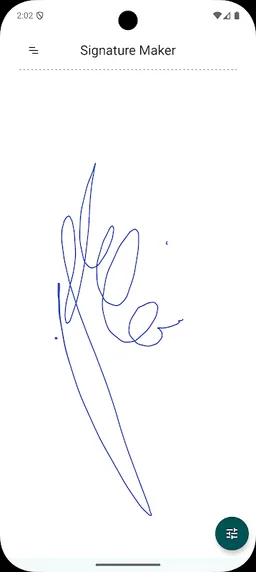
Go digital with Signature Maker, the most realistic and efficient app to create your electronic signature. Draw your signature on the screen with your finger or stylus, and get a crisp, high-definition result instantly.
Unlike other apps, Signature Maker offers realistic pen pressure sensitivity and smooth strokes—no jagged lines, no lag. It looks exactly as if you signed with a real pen.
🚀 KEY FEATURES:
✒️ Realistic Digital Signature: Our algorithm detects pressure and speed to create a natural, handwritten look. No "robotic" cuts.
📄 Transparent Background (PNG): Your signature is saved automatically with a clear background, ready to be pasted into any PDF, Word doc, or image.
🎨 Full Customization: Choose from millions of colors and adjust the stroke thickness to match your style.
📂 Save & Organize: Store your favorite signatures in the internal gallery for quick access later.
📤 Instant Sharing: Send your signature via Email, WhatsApp, Drive, Dropbox, or Telegram in one tap.
📱 Tablet Ready: Optimized interface for both smartphones and tablets with large screens.
🔓 Open Source & Free: No hidden costs, completely free to use. You can even disable ads for free!
HOW IT WORKS:
1️⃣ Choose: Select your preferred ink color and stroke thickness.
2️⃣ Sign: Draw on the screen using your finger or a capacitive stylus.
3️⃣ Save: The app instantly creates a transparent high-quality image.
4️⃣ Use: Share it to your Drive or email, and attach it to your documents (PDF, Doc, etc.).
✅ Perfect for: Signing contracts, authorizing documents, copyrighting photos, or creating personal watermarks.
💡 PRO TIP: MAKE YOUR OWN STYLUS
Want even more precision without buying accessories? You can make a DIY stylus using a pencil and aluminum foil. Ensure the foil touches both your skin and the screen to create the contact needed for drawing.
---
Signature Maker is an Open Source project (GNU GPL V3.0). We are constantly improving thanks to user feedback. If you are interested in the code or want to contribute, visit us on GitHub:
https://github.com/rulogarcillan/SignatureMaker
Go digital with Signature Maker, the most realistic and efficient app to create your electronic signature. Draw your signature on the screen with your finger or stylus, and get a crisp, high-definition result instantly.
Unlike other apps, Signature Maker offers realistic pen pressure sensitivity and smooth strokes—no jagged lines, no lag. It looks exactly as if you signed with a real pen.
🚀 KEY FEATURES:
✒️ Realistic Digital Signature: Our algorithm detects pressure and speed to create a natural, handwritten look. No "robotic" cuts.
📄 Transparent Background (PNG): Your signature is saved automatically with a clear background, ready to be pasted into any PDF, Word doc, or image.
🎨 Full Customization: Choose from millions of colors and adjust the stroke thickness to match your style.
📂 Save & Organize: Store your favorite signatures in the internal gallery for quick access later.
📤 Instant Sharing: Send your signature via Email, WhatsApp, Drive, Dropbox, or Telegram in one tap.
📱 Tablet Ready: Optimized interface for both smartphones and tablets with large screens.
🔓 Open Source & Free: No hidden costs, completely free to use. You can even disable ads for free!
HOW IT WORKS:
1️⃣ Choose: Select your preferred ink color and stroke thickness.
2️⃣ Sign: Draw on the screen using your finger or a capacitive stylus.
3️⃣ Save: The app instantly creates a transparent high-quality image.
4️⃣ Use: Share it to your Drive or email, and attach it to your documents (PDF, Doc, etc.).
✅ Perfect for: Signing contracts, authorizing documents, copyrighting photos, or creating personal watermarks.
💡 PRO TIP: MAKE YOUR OWN STYLUS
Want even more precision without buying accessories? You can make a DIY stylus using a pencil and aluminum foil. Ensure the foil touches both your skin and the screen to create the contact needed for drawing.
---
Signature Maker is an Open Source project (GNU GPL V3.0). We are constantly improving thanks to user feedback. If you are interested in the code or want to contribute, visit us on GitHub:
https://github.com/rulogarcillan/SignatureMaker
Required features
- Faketouch android.hardware.faketouch
Permissions (12)
Signature Maker: Digital Sign requests the following Android permissions:
- Access Adservices Ad Id android.permission.ACCESS_ADSERVICES_AD_ID
- Access Adservices Attribution android.permission.ACCESS_ADSERVICES_ATTRIBUTION
- Access Adservices Topics android.permission.ACCESS_ADSERVICES_TOPICS
- Access Network State android.permission.ACCESS_NETWORK_STATE
- Foreground Service android.permission.FOREGROUND_SERVICE
- Internet android.permission.INTERNET
- Read Media Images android.permission.READ_MEDIA_IMAGES
- Vibrate android.permission.VIBRATE
- Wake Lock android.permission.WAKE_LOCK
- Finsky Permission Bind Get Install Referrer Service com.google.android.finsky.permission.BIND_GET_INSTALL_REFERRER_SERVICE
- Gms Permission Ad Id com.google.android.gms.permission.AD_ID
- Com Signaturemaker App Dynamic Receiver Not Exported Permission com.signaturemaker.app.DYNAMIC_RECEIVER_NOT_EXPORTED_PERMISSION