Shortcutter - Quick Settings, Shortcuts & Widgets
The Ultimate Android Quick Settings PullDown, Shortcut Creator & Widget Provider
LeeDrOiD · com.leedroid.shortcutter



UpdatedJun 7, 2024
PublishedJan 16, 2021
Packagecom.leedroid.shortcutter
MD5fc05c8ebb684c805c94aa72b839fc6ea
SHA1 (signer)87:F3:D8:C5:85:04:46:07:BE:B2:69:43:AC:EE:85:7E:5D:95:1D:66
Signed byCN=Lee Bailey, OU=LeeDrOiD Developments, O=LeeDrOiD Developments
Malware scanTRUSTED
Websitehttp://www.leedroid.co.uk
Contact[email protected]
Privacy policyView
What's new
v7.8.0:
* Fix crash in rounded corners & screen filter.
v7.7.9:
* Improved colour picker.
* Add sidebar/toolbox corner scale option.
* Improve sidebar background dimming.
* Make background dim level adjustable.
* Screen Lock shortcut now uses accessibility on Android 9+.
* Allow full sidebar/toolbox transparency.
* Ensure sidebar refreshed correctly when using designer.
* Allow manual adjustment for Sidebar trigger.
* Bug Fixes.
* Fix crash in rounded corners & screen filter.
v7.7.9:
* Improved colour picker.
* Add sidebar/toolbox corner scale option.
* Improve sidebar background dimming.
* Make background dim level adjustable.
* Screen Lock shortcut now uses accessibility on Android 9+.
* Allow full sidebar/toolbox transparency.
* Ensure sidebar refreshed correctly when using designer.
* Allow manual adjustment for Sidebar trigger.
* Bug Fixes.
Description
Shortcutter is the ultimate Android Quick Settings, Shortcut Provider & Quick Access Toolbox giving you instant access to Apps, Contacts, Web Sites, Settings, Actions, Activities, Shortcuts & Services in an instant.
It's simpler than it looks & it's free to use, with additional features for less than the cost of a cup of coffee, its also under constant development!.
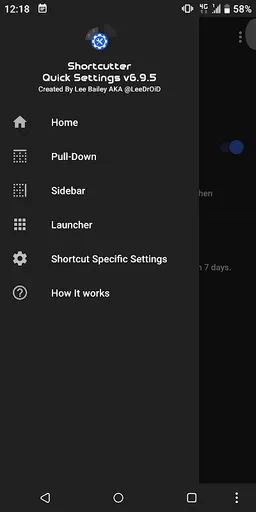
Access 100's of shortcuts from your home screen launcher, the system quick settings pull-down, the Shortcutter always on top Side Bar/Launcher or via Shortcutters Widget's.
Please pay attention to the guides & contact me if you need help :)
Shortcutter Side Bar / Side Launcher:
- A Floating Toolbox or Swipe out Side Bar that's always on top and accessible
- Can be positioned at the right, left or bottom of your screen.
- Over 100 shortcuts available, including up to 40 Custom tiles giving you direct access to Apps, Activities, System Shortcuts, Direct Call, Direct Dial & Web Links!
- Create your own theme, layout & design.
System Quick Settings Pull Down Tiles:
How to add them: https://youtu.be/uaPtqfXkIkE
* An abundance of additional Quick Settings tiles & services available for the standard user*
* Additional tiles for Advanced users with Settings Secure access.
* Additional root tiles also available for the power users out there.
Exposed Launcher Shortcuts (micro app's):
- Shortcutter Exposed Launcher Shortcuts allow you to toggle settings & services from your app drawer, home screen, HTC Edge Sense, Tasker & more!
A number of tiles & services require elevated permissions:
* Admin - Screen Lock.
* Accessibility - Secure Activity Detection, Power Menu, Recent Apps & Split Screen, Secure Power Menu & detecting volume key presses for Volume Panel.
Some of the Shortcuts/Tiles/Toggles available:
- Auto Sync
- App Drawer/Folder
- Bluetooth
- Battery Percentage
- Brightness Preset
- Screen Cast
- Launch Camera
- Clipboard Editor
- Clicker/Counter
- Countdown Timer
- Dice
- Data Usage
- Data Speed
- Expand Quick Settings
- Expand Notifications
- Flashlight
- Floating Calculator
- File Browser
- Font Scale
- Keyboard/IME Selector
- Location Mode: Off, Device Only, Battery Saving & High Accuracy*
- In Ear Audio
- Notification Log
- Mobile Data (Non direct)
- Multi Window
- Mute Media
- My Location
- My Play Apps
- New Tweet
- New Email
- Next Alarm
- Night Light/Desk Clock
- NFC*
- Power Menu
- Play/Pause Music
- Power Saver*
- Quick SMS
- Quick Reminder
- Recent Apps, Back & Home buttons.
- RAM Usage
- Rounded Corners
- Ring Mode
- Screen Wake AKA Caffeine
- Screen Record
-- Custom video profileçs
- Screenshot - High Res
--- Custom save location for screenshots & recordings.
--- Notifications with View, Share & Delete actions
- Screen Timeout
- Screen Brightness Mode
- Speaker Audio
- Screen Filter AKA Night Mode
- Screen Lock - *Requires Device Admin*
- Screen Orientation
- Stopwatch
- Tethering & HotSpot
- Touch Vibration
- Custom Pie style volume Panel
- Unknown Sources
- Web Search
- WiFi
- WiFi Hotspot
- Assistant
- VPN
- Weather
- SystemUI Tuner
- Custom Tiles - Add a shortcut to any application, activity, shortcut on your device, assign a web address/search term, direct dial, direct message or shell command (Root).
With Settings Secure Access (Enabled with a PC command):
- ADB
- Data Roaming
- Ambient Display
- Heads Up Notifications
- Immersive Mode/Expanded Desktop
- Keep Screen On While Charging
- Monochrome
Additional ROOT ONLY Tiles:
- Mobile Network Mode
- Advanced Power Menu
- Assign shell commands to custom tiles
Add an extra layer of security in your quick settings pulldown, replace your existing tiles with shortcutter tiles & enable the Lock Shortcutter Pull-Down Tiles option!
Some functionality may be impacted by manufacturer changes
It's simpler than it looks & it's free to use, with additional features for less than the cost of a cup of coffee, its also under constant development!.
Access 100's of shortcuts from your home screen launcher, the system quick settings pull-down, the Shortcutter always on top Side Bar/Launcher or via Shortcutters Widget's.
Please pay attention to the guides & contact me if you need help :)
Shortcutter Side Bar / Side Launcher:
- A Floating Toolbox or Swipe out Side Bar that's always on top and accessible
- Can be positioned at the right, left or bottom of your screen.
- Over 100 shortcuts available, including up to 40 Custom tiles giving you direct access to Apps, Activities, System Shortcuts, Direct Call, Direct Dial & Web Links!
- Create your own theme, layout & design.
System Quick Settings Pull Down Tiles:
How to add them: https://youtu.be/uaPtqfXkIkE
* An abundance of additional Quick Settings tiles & services available for the standard user*
* Additional tiles for Advanced users with Settings Secure access.
* Additional root tiles also available for the power users out there.
Exposed Launcher Shortcuts (micro app's):
- Shortcutter Exposed Launcher Shortcuts allow you to toggle settings & services from your app drawer, home screen, HTC Edge Sense, Tasker & more!
A number of tiles & services require elevated permissions:
* Admin - Screen Lock.
* Accessibility - Secure Activity Detection, Power Menu, Recent Apps & Split Screen, Secure Power Menu & detecting volume key presses for Volume Panel.
Some of the Shortcuts/Tiles/Toggles available:
- Auto Sync
- App Drawer/Folder
- Bluetooth
- Battery Percentage
- Brightness Preset
- Screen Cast
- Launch Camera
- Clipboard Editor
- Clicker/Counter
- Countdown Timer
- Dice
- Data Usage
- Data Speed
- Expand Quick Settings
- Expand Notifications
- Flashlight
- Floating Calculator
- File Browser
- Font Scale
- Keyboard/IME Selector
- Location Mode: Off, Device Only, Battery Saving & High Accuracy*
- In Ear Audio
- Notification Log
- Mobile Data (Non direct)
- Multi Window
- Mute Media
- My Location
- My Play Apps
- New Tweet
- New Email
- Next Alarm
- Night Light/Desk Clock
- NFC*
- Power Menu
- Play/Pause Music
- Power Saver*
- Quick SMS
- Quick Reminder
- Recent Apps, Back & Home buttons.
- RAM Usage
- Rounded Corners
- Ring Mode
- Screen Wake AKA Caffeine
- Screen Record
-- Custom video profileçs
- Screenshot - High Res
--- Custom save location for screenshots & recordings.
--- Notifications with View, Share & Delete actions
- Screen Timeout
- Screen Brightness Mode
- Speaker Audio
- Screen Filter AKA Night Mode
- Screen Lock - *Requires Device Admin*
- Screen Orientation
- Stopwatch
- Tethering & HotSpot
- Touch Vibration
- Custom Pie style volume Panel
- Unknown Sources
- Web Search
- WiFi
- WiFi Hotspot
- Assistant
- VPN
- Weather
- SystemUI Tuner
- Custom Tiles - Add a shortcut to any application, activity, shortcut on your device, assign a web address/search term, direct dial, direct message or shell command (Root).
With Settings Secure Access (Enabled with a PC command):
- ADB
- Data Roaming
- Ambient Display
- Heads Up Notifications
- Immersive Mode/Expanded Desktop
- Keep Screen On While Charging
- Monochrome
Additional ROOT ONLY Tiles:
- Mobile Network Mode
- Advanced Power Menu
- Assign shell commands to custom tiles
Add an extra layer of security in your quick settings pulldown, replace your existing tiles with shortcutter tiles & enable the Lock Shortcutter Pull-Down Tiles option!
Some functionality may be impacted by manufacturer changes
Required features
- Bluetooth android.hardware.bluetooth
- Camera android.hardware.camera
- Faketouch android.hardware.faketouch
- Location android.hardware.location
- Microphone android.hardware.microphone
- Wifi android.hardware.wifi
Permissions (43)
Shortcutter - Quick Settings, Shortcuts & Widgets requests the following Android permissions:
- Android Manifest Permission Media Content Control android.Manifest.permission.MEDIA_CONTENT_CONTROL
- Access Coarse Location android.permission.ACCESS_COARSE_LOCATION
- Access Fine Location android.permission.ACCESS_FINE_LOCATION
- Access Network State android.permission.ACCESS_NETWORK_STATE
- Access Notification Policy android.permission.ACCESS_NOTIFICATION_POLICY
- Access Wifi State android.permission.ACCESS_WIFI_STATE
- Action Manage Overlay Permission android.permission.ACTION_MANAGE_OVERLAY_PERMISSION
- Bind Quick Settings Tile android.permission.BIND_QUICK_SETTINGS_TILE
- Bluetooth android.permission.BLUETOOTH
- Bluetooth Admin android.permission.BLUETOOTH_ADMIN
- Call Phone android.permission.CALL_PHONE
- Camera android.permission.CAMERA
- Change Wifi State android.permission.CHANGE_WIFI_STATE
- Expand Status Bar android.permission.EXPAND_STATUS_BAR
- Foreground Service android.permission.FOREGROUND_SERVICE
- Inject Events android.permission.INJECT_EVENTS
- Internal System Window android.permission.INTERNAL_SYSTEM_WINDOW
- Internet android.permission.INTERNET
- Media Content Control android.permission.MEDIA_CONTENT_CONTROL
- Modify Audio Settings android.permission.MODIFY_AUDIO_SETTINGS
- Nfc android.permission.NFC
- Package Usage Stats android.permission.PACKAGE_USAGE_STATS
- Read Contacts android.permission.READ_CONTACTS
- Read External Storage android.permission.READ_EXTERNAL_STORAGE
- Read Phone State android.permission.READ_PHONE_STATE
- Read Sync Settings android.permission.READ_SYNC_SETTINGS
- Read Sync Stats android.permission.READ_SYNC_STATS
- Reboot android.permission.REBOOT
- Receive Boot Completed android.permission.RECEIVE_BOOT_COMPLETED
- Record Audio android.permission.RECORD_AUDIO
- Recovery android.permission.RECOVERY
- Status Bar Service android.permission.STATUS_BAR_SERVICE
- System Alert Window android.permission.SYSTEM_ALERT_WINDOW
- Vibrate android.permission.VIBRATE
- Wake Lock android.permission.WAKE_LOCK
- Write External Storage android.permission.WRITE_EXTERNAL_STORAGE
- Write Secure Settings android.permission.WRITE_SECURE_SETTINGS
- Write Settings android.permission.WRITE_SETTINGS
- Write Sync Settings android.permission.WRITE_SYNC_SETTINGS
- Com Android Alarm Permission Set Alarm com.android.alarm.permission.SET_ALARM
- Com Android Launcher Permission Install Shortcut com.android.launcher.permission.INSTALL_SHORTCUT
- Com Android Launcher Permission Uninstall Shortcut com.android.launcher.permission.UNINSTALL_SHORTCUT
- Com Android Vending Billing com.android.vending.BILLING