Pixel Brush: Pixel Art Drawing
8 bit drawing, coloring hobby to make pixel art games & merch. Aseprite support!
Jaween Ediriweera · com.jaween.paint


UpdatedJan 16, 2024
PublishedJan 16, 2024
Packagecom.jaween.paint
MD5343b0c018dedc61060cd8cec8d014145
SHA1 (signer)69:2A:25:91:9C:26:15:0A:95:F8:0F:4F:84:6A:AD:B7:52:A7:6F:F4
Signed byCN=Jaween Ediriweera, L=Adelaide, ST=South Australia, C=AU
Architecturesx86-64, armeabi-v7a, arm64-v8a
Malware scanTRUSTED
Contact[email protected]
Privacy policyView
What's new
2.1.8, 2.1.9, 2.1.10:
• Fixed a bug which caused exports to fail on Android 13
• Fixed a bug which caused large imports to cut off
• Improved the Portuguese (Brazil) translation significantly (thank you to Dias Stebanäk!)
• Fixed a bug which incorrectly sorted drawings by name
• Fixed a bug which showed an error if permissions were permanently denied (now shows a request)
• Fixed a bug causing palettes with invalid names to not load
• Fixed a bug which caused the resize dialog to be blank
• Fixed a bug which caused exports to fail on Android 13
• Fixed a bug which caused large imports to cut off
• Improved the Portuguese (Brazil) translation significantly (thank you to Dias Stebanäk!)
• Fixed a bug which incorrectly sorted drawings by name
• Fixed a bug which showed an error if permissions were permanently denied (now shows a request)
• Fixed a bug causing palettes with invalid names to not load
• Fixed a bug which caused the resize dialog to be blank
Description
Pixel Brush is a pixel art creator, helping you to learn a new hobby and create merch! Unlike color by number apps, you create your own 8 bit art and use it to create merch.
This drawing app for kids and adults helps you learn to draw art! You can draw 8 and 16 bit graphics, share to the community, and gain feedback.
Import your pixel art from Aseprite into Pixel Brush, and export it back to Aseprite.
Intuitive for beginners
• Pinch to zoom and tap to draw
• Pick from professional built-in color palettes, or import one from Lospec
• Zooming in reveals a mini-preview (try dragging it around)
Animate like a pro
• Create beautiful animations with onion-skinning, then share your pixel animation as a GIF/MP4
• Speed up or slow down individual frames
• Layers let you separate elements of your art, handy for organization
Grow as an artist
• Share your pixel art with the friendly community, we'd love to see your creations!
• Create art on canvases up to 1024x1024
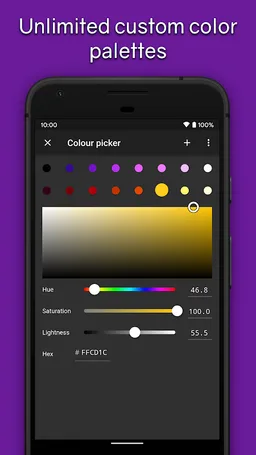
• Save unlimited color palettes (including 8 bit palettes)
Other features:
• Export and import Aseprite files
• No ads
• Saving happens automatically, so you can focus on your creations
• Sharp exports with no blurring
• Create Isometric lines
• You can use a mouse if you'd prefer!
Designed for easy drawing, Pixel Brush is a pixel art creator app which can help you learn how to draw and start your new hobby!
Plenty more features are coming soon, so follow on social media (links in app) and stay tuned!
This drawing app for kids and adults helps you learn to draw art! You can draw 8 and 16 bit graphics, share to the community, and gain feedback.
Import your pixel art from Aseprite into Pixel Brush, and export it back to Aseprite.
Intuitive for beginners
• Pinch to zoom and tap to draw
• Pick from professional built-in color palettes, or import one from Lospec
• Zooming in reveals a mini-preview (try dragging it around)
Animate like a pro
• Create beautiful animations with onion-skinning, then share your pixel animation as a GIF/MP4
• Speed up or slow down individual frames
• Layers let you separate elements of your art, handy for organization
Grow as an artist
• Share your pixel art with the friendly community, we'd love to see your creations!
• Create art on canvases up to 1024x1024
• Save unlimited color palettes (including 8 bit palettes)
Other features:
• Export and import Aseprite files
• No ads
• Saving happens automatically, so you can focus on your creations
• Sharp exports with no blurring
• Create Isometric lines
• You can use a mouse if you'd prefer!
Designed for easy drawing, Pixel Brush is a pixel art creator app which can help you learn how to draw and start your new hobby!
Plenty more features are coming soon, so follow on social media (links in app) and stay tuned!
Required features
- Faketouch android.hardware.faketouch
Permissions (8)
Pixel Brush: Pixel Art Drawing requests the following Android permissions:
- Access Network State android.permission.ACCESS_NETWORK_STATE
- Internet android.permission.INTERNET
- Read External Storage android.permission.READ_EXTERNAL_STORAGE
- Wake Lock android.permission.WAKE_LOCK
- Com Android Vending Billing com.android.vending.BILLING
- Finsky Permission Bind Get Install Referrer Service com.google.android.finsky.permission.BIND_GET_INSTALL_REFERRER_SERVICE
- Gms Permission Ad Id com.google.android.gms.permission.AD_ID
- Com Jaween Paint Dynamic Receiver Not Exported Permission com.jaween.paint.DYNAMIC_RECEIVER_NOT_EXPORTED_PERMISSION