Oops AppLock - Invisible Lock
Invisible app locker - unlock with secret volume patterns & hidden buttons
Keybotivated · com.keybotivated.applock




UpdatedFeb 6, 2026
PublishedDec 11, 2020
Packagecom.keybotivated.applock
MD5193cf179fdcb67ffb6138b028d171006
SHA1 (signer)8E:B6:D7:11:F6:F2:1C:66:4F:04:54:9C:CC:98:67:F3:81:E6:59:07
Signed byCN=Fazil Kunhamed
Architecturesx86, x86-64, armeabi-v7a, arm64-v8a
Malware scanTRUSTED
Websitehttps://about.me/pachu.fasi
Contact[email protected]
Privacy policyView
What's new
- Improved PIN-first onboarding flow
- Faster app lock detection
- Permission explanations updated for clarity
- Performance and stability improvements
- Faster app lock detection
- Permission explanations updated for clarity
- Performance and stability improvements
Description
The Only Truly Invisible App Locker
Unlock your apps without anyone seeing how. No visible PINs, no on-screen patterns - just secret volume button combos and invisible edge buttons.
★★★★★ "Hilariously brilliant and effective" - Android Authority
★★★★★ Featured by Lifehacker & Addictive Tips
---
WHY OOPS APPLOCK IS DIFFERENT
Unlike traditional app lockers with obvious keypads, Oops AppLock keeps your unlock method completely secret:
- Volume Pattern Lock - Unlock using volume key combinations.
- Invisible Virtual Buttons - Tap hidden buttons on screen edges.
- Transparent Lock Screen - Looks like the app is already open.
- Disguised Icon - Appears as a notes app in your drawer.
- Intruder Selfie - Catches snoopers with front camera photo.
Someone watching over your shoulder literally cannot see how you unlock.
---
POWERFUL PRIVACY PROTECTION
- Lock any app - WhatsApp, Gallery, Gmail, Instagram, banking apps.
- Multiple unlock methods - PIN, volume patterns, virtual buttons.
- Intruder Detection - Photo capture on failed attempts.
- Auto re-lock when screen turns off.
- AES-256 encryption for your PIN.
- Zero data collection - your privacy stays on your device
---
🎯 HOW IT WORKS
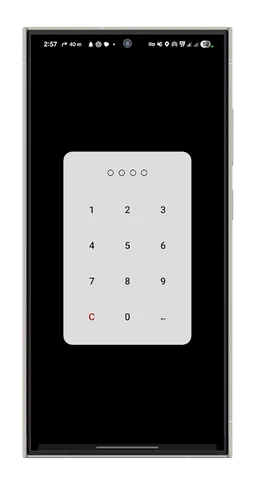
1. Set up your secure PIN (4-6 digits)
2. Add a volume button pattern for quick access
3. Select which apps to protect
4. Done! Apps are now invisibly locked
To unlock: Press your secret volume pattern or tap invisible buttons. No visible UI appears!. Flick screen to enter PIN.
---
PRO UPGRADE (one-time purchase):
- Transparent backgrounds for unlimitted apps.
- Custom background.
- View captured Intruder photo.
- Remove all ads.
---
ADVANCED FEATURES
Smart Security:
- Device Admin protection
- Hide app from launcher
- Prevent uninstallation when locked
- Vibration feedback
- Battery optimized
Privacy First:
- No internet connection required
- No data collection or tracking
- No cloud sync
- All data encrypted locally
---
COMPATIBILITY
- Android 6.0+ (works perfectly on Android 14)
- All devices: Samsung, Google Pixel, OnePlus, Xiaomi, etc.§
- Optimized for tablets and foldables
- Works with broken volume buttons (virtual button fallback)
---
TRUSTED SINCE 2014
- 10+ years of development and refinement
- Truly invisible - not just "hidden"
- No sketchy permissions or data harvesting
- Actively maintained with regular updates
- Thousands of 5-star reviews
- Responsive developer support
---
REQUIRED PERMISSIONS
We only ask for what's necessary:
- Usage Access - Detect when locked apps are opened (required)
- Display Over Apps - Show lock screens (required)
- Accessibility Service - Better detection, lower battery (optional but recommended)
- Camera - Intruder selfie feature (optional)
- Vibrate - Haptic feedback (optional)
All permissions are explained clearly during setup with visual guides.
---
IN-APP HELP
New to invisible app locking? We've got you covered:
- Interactive onboarding for new users
- Visual guides for every feature
- Step-by-step setup assistance
- Training mode for volume patterns
- Virtual button position indicators
---
Download now and protect your privacy the invisible way!
Perfect for:
- Keeping photos and messages private
- Protecting banking and financial apps
- Securing work apps on personal devices
- Preventing kids from accessing certain apps
- Anyone who values true privacy
---
TRY PRO FREE
Watch a short ad to unlock 1 hour of Pro features - try before you buy!
---
Unlock your apps without anyone seeing how. No visible PINs, no on-screen patterns - just secret volume button combos and invisible edge buttons.
★★★★★ "Hilariously brilliant and effective" - Android Authority
★★★★★ Featured by Lifehacker & Addictive Tips
---
WHY OOPS APPLOCK IS DIFFERENT
Unlike traditional app lockers with obvious keypads, Oops AppLock keeps your unlock method completely secret:
- Volume Pattern Lock - Unlock using volume key combinations.
- Invisible Virtual Buttons - Tap hidden buttons on screen edges.
- Transparent Lock Screen - Looks like the app is already open.
- Disguised Icon - Appears as a notes app in your drawer.
- Intruder Selfie - Catches snoopers with front camera photo.
Someone watching over your shoulder literally cannot see how you unlock.
---
POWERFUL PRIVACY PROTECTION
- Lock any app - WhatsApp, Gallery, Gmail, Instagram, banking apps.
- Multiple unlock methods - PIN, volume patterns, virtual buttons.
- Intruder Detection - Photo capture on failed attempts.
- Auto re-lock when screen turns off.
- AES-256 encryption for your PIN.
- Zero data collection - your privacy stays on your device
---
🎯 HOW IT WORKS
1. Set up your secure PIN (4-6 digits)
2. Add a volume button pattern for quick access
3. Select which apps to protect
4. Done! Apps are now invisibly locked
To unlock: Press your secret volume pattern or tap invisible buttons. No visible UI appears!. Flick screen to enter PIN.
---
PRO UPGRADE (one-time purchase):
- Transparent backgrounds for unlimitted apps.
- Custom background.
- View captured Intruder photo.
- Remove all ads.
---
ADVANCED FEATURES
Smart Security:
- Device Admin protection
- Hide app from launcher
- Prevent uninstallation when locked
- Vibration feedback
- Battery optimized
Privacy First:
- No internet connection required
- No data collection or tracking
- No cloud sync
- All data encrypted locally
---
COMPATIBILITY
- Android 6.0+ (works perfectly on Android 14)
- All devices: Samsung, Google Pixel, OnePlus, Xiaomi, etc.§
- Optimized for tablets and foldables
- Works with broken volume buttons (virtual button fallback)
---
TRUSTED SINCE 2014
- 10+ years of development and refinement
- Truly invisible - not just "hidden"
- No sketchy permissions or data harvesting
- Actively maintained with regular updates
- Thousands of 5-star reviews
- Responsive developer support
---
REQUIRED PERMISSIONS
We only ask for what's necessary:
- Usage Access - Detect when locked apps are opened (required)
- Display Over Apps - Show lock screens (required)
- Accessibility Service - Better detection, lower battery (optional but recommended)
- Camera - Intruder selfie feature (optional)
- Vibrate - Haptic feedback (optional)
All permissions are explained clearly during setup with visual guides.
---
IN-APP HELP
New to invisible app locking? We've got you covered:
- Interactive onboarding for new users
- Visual guides for every feature
- Step-by-step setup assistance
- Training mode for volume patterns
- Virtual button position indicators
---
Download now and protect your privacy the invisible way!
Perfect for:
- Keeping photos and messages private
- Protecting banking and financial apps
- Securing work apps on personal devices
- Preventing kids from accessing certain apps
- Anyone who values true privacy
---
TRY PRO FREE
Watch a short ad to unlock 1 hour of Pro features - try before you buy!
---
Required features
- Camera android.hardware.camera
- Faketouch android.hardware.faketouch
- Screen Portrait android.hardware.screen.portrait
Permissions (24)
Oops AppLock - Invisible Lock requests the following Android permissions:
- Access Adservices Ad Id android.permission.ACCESS_ADSERVICES_AD_ID
- Access Adservices Attribution android.permission.ACCESS_ADSERVICES_ATTRIBUTION
- Access Adservices Topics android.permission.ACCESS_ADSERVICES_TOPICS
- Access Network State android.permission.ACCESS_NETWORK_STATE
- Camera android.permission.CAMERA
- Foreground Service android.permission.FOREGROUND_SERVICE
- Foreground Service Special Use android.permission.FOREGROUND_SERVICE_SPECIAL_USE
- Get Tasks android.permission.GET_TASKS
- Internet android.permission.INTERNET
- Package Usage Stats android.permission.PACKAGE_USAGE_STATS
- Post Notifications android.permission.POST_NOTIFICATIONS
- Read Phone State android.permission.READ_PHONE_STATE
- Receive Boot Completed android.permission.RECEIVE_BOOT_COMPLETED
- Receive Launch Broadcasts android.permission.RECEIVE_LAUNCH_BROADCASTS
- Request Ignore Battery Optimizations android.permission.REQUEST_IGNORE_BATTERY_OPTIMIZATIONS
- System Alert Window android.permission.SYSTEM_ALERT_WINDOW
- Use Biometric android.permission.USE_BIOMETRIC
- Use Fingerprint android.permission.USE_FINGERPRINT
- Vibrate android.permission.VIBRATE
- Wake Lock android.permission.WAKE_LOCK
- Com Android Vending Billing com.android.vending.BILLING
- Finsky Permission Bind Get Install Referrer Service com.google.android.finsky.permission.BIND_GET_INSTALL_REFERRER_SERVICE
- Gms Permission Ad Id com.google.android.gms.permission.AD_ID
- Com Keybotivated Applock Dynamic Receiver Not Exported Permission com.keybotivated.applock.DYNAMIC_RECEIVER_NOT_EXPORTED_PERMISSION