

OLIVIA Mobile Banking TKB
Discover our new OLIVIA Mobile Banking.
Thurgauer Kantonalbank · ch.tkb.androidapp

UpdatedMar 1, 2026
PublishedApr 22, 2021
Packagech.tkb.androidapp
MD5d46718196ea96f309ff70787bbea4e45
SHA1 (signer)A3:D5:65:1D:51:F2:81:EB:DE:B6:22:E8:85:01:1C:EE:09:A5:76:2B
Signed byCN=TKB, OU=TKB, O=Thurgauer Kantonalbank, L=Weinfelden, ST=TG, C=CH
Architecturesx86, x86-64, armeabi-v7a, arm64-v8a
Malware scanTRUSTED
Websitehttp://www.tkb.ch
Contact[email protected]
Privacy policyView
What's new
Mit dieser Version wurden diverse Fehler behoben.
Description
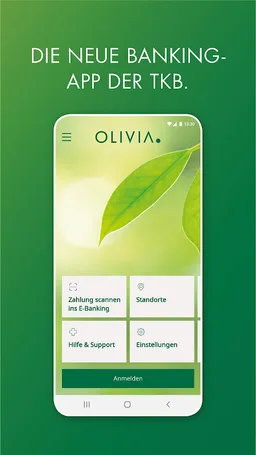
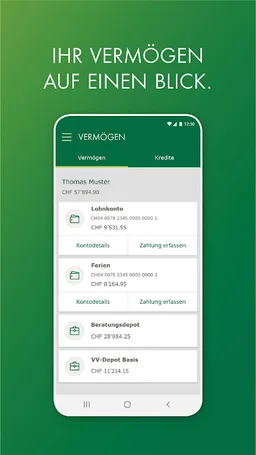
The OLIVIA app is your portal for mobile banking and the digital services of the Thurgauer Kantonalbank. Quick check a balance? Scan and pay for a payment? Or check if a stock market order has been executed? Do your banking when and where you want it.
Please note that in order to log in with the OLIVIA Mobile Banking App, you also need the OLIVIA Key App need.
ALL THINGS NEW
Welcome to OLIVIA. Discover the new, completely redesigned Mobile Banking App of
Thurgau Cantonal Bank.
PERSONALLY
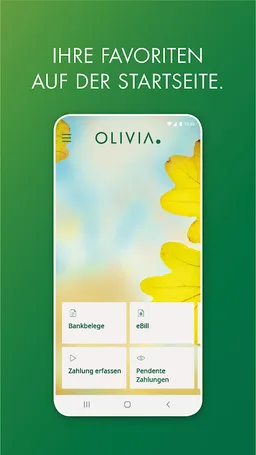
Create your personal home page with your favorites.
NEW SERVICES
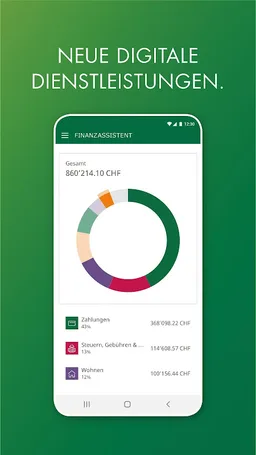
Now you can order foreign currencies through the app, track your expenses with the Financial Assistant, and benefit from other digital services.
FAST
Scan payment slips instead of tapping deposit slips. This is how you make your payments easy and convenient.
FOR SURE
The OLIVIA Key App makes our mobile banking even safer. Install the Key App before using the OLIVIA App for Mobile Banking.
safety instructions
Make your contribution to safety and comply with the following safety recommendations:
• Never leave your device unattended.
• Use a strong PIN and keep it secret.
• Do not save the access data on the mobile device.
• Always keep your login information hidden in the public.
• Always end a mobile banking session with correct logouts.
• Use the latest version of the OLIVIA app and operating system.
• Activate the code lock for your device.
• Do not modify the mobile device (for example, jailbreak).
Further safety instructions can be found at www.tkb.ch/safety
Legal notice
Please note that downloading, installing and using this application may give third parties (such as Google) an existing, former or future customer relationship between you and your bank. By downloading this app, you expressly agree that the data you submit to Google may be collected, transferred, edited and made accessible in accordance with their terms. The terms and conditions
Please note that in order to log in with the OLIVIA Mobile Banking App, you also need the OLIVIA Key App need.
ALL THINGS NEW
Welcome to OLIVIA. Discover the new, completely redesigned Mobile Banking App of
Thurgau Cantonal Bank.
PERSONALLY
Create your personal home page with your favorites.
NEW SERVICES
Now you can order foreign currencies through the app, track your expenses with the Financial Assistant, and benefit from other digital services.
FAST
Scan payment slips instead of tapping deposit slips. This is how you make your payments easy and convenient.
FOR SURE
The OLIVIA Key App makes our mobile banking even safer. Install the Key App before using the OLIVIA App for Mobile Banking.
safety instructions
Make your contribution to safety and comply with the following safety recommendations:
• Never leave your device unattended.
• Use a strong PIN and keep it secret.
• Do not save the access data on the mobile device.
• Always keep your login information hidden in the public.
• Always end a mobile banking session with correct logouts.
• Use the latest version of the OLIVIA app and operating system.
• Activate the code lock for your device.
• Do not modify the mobile device (for example, jailbreak).
Further safety instructions can be found at www.tkb.ch/safety
Legal notice
Please note that downloading, installing and using this application may give third parties (such as Google) an existing, former or future customer relationship between you and your bank. By downloading this app, you expressly agree that the data you submit to Google may be collected, transferred, edited and made accessible in accordance with their terms. The terms and conditions
Required features
- Camera android.hardware.camera
- Faketouch android.hardware.faketouch
- Screen Portrait android.hardware.screen.portrait
Permissions (14)
OLIVIA Mobile Banking TKB requests the following Android permissions:
- Access Coarse Location android.permission.ACCESS_COARSE_LOCATION
- Access Fine Location android.permission.ACCESS_FINE_LOCATION
- Access Network State android.permission.ACCESS_NETWORK_STATE
- Camera android.permission.CAMERA
- Flashlight android.permission.FLASHLIGHT
- Foreground Service android.permission.FOREGROUND_SERVICE
- Internet android.permission.INTERNET
- Post Notifications android.permission.POST_NOTIFICATIONS
- Receive Boot Completed android.permission.RECEIVE_BOOT_COMPLETED
- Use Biometric android.permission.USE_BIOMETRIC
- Use Fingerprint android.permission.USE_FINGERPRINT
- Wake Lock android.permission.WAKE_LOCK
- Ch Tkb Androidapp Dynamic Receiver Not Exported Permission ch.tkb.androidapp.DYNAMIC_RECEIVER_NOT_EXPORTED_PERMISSION
- C2dm Permission Receive com.google.android.c2dm.permission.RECEIVE