NOVA Video Player
Video player for local/network content with subtitle/metadata download support
Courville Software · org.courville.nova



UpdatedDec 5, 2025
PublishedAug 27, 2018
Packageorg.courville.nova
MD5765eb1ebb558f84395437f69f5cb45a8
SHA1 (signer)1C:12:D3:2B:13:5A:82:96:68:A8:0D:FB:86:CD:F5:5F:2D:6E:47:FB
Signed byCN=Software de Courville, OU=courville software, O=courville, L=Paris, ST=IDF, C=FR
Architecturesarmeabi-v7a
Malware scanTRUSTED
Websitehttp://www.courville.org
Contact[email protected]
What's new
- target SDK 35, raise min SDK to 23 (Android 6.0)
- blacklist recycle bins on popular NAS
- fix audio delay picker focus on Android TV
- new subtitle title format
- upgrade ffmpeg to 7.1.1 and dav1d to 1.5.1
- fix external player stopping after a while
- stability enhancements
- blacklist recycle bins on popular NAS
- fix audio delay picker focus on Android TV
- new subtitle title format
- upgrade ffmpeg to 7.1.1 and dav1d to 1.5.1
- fix external player stopping after a while
- stability enhancements
Description
Nova is an opeN sOurce Video plAyer designed for tablets, phones and AndroidTV devices.available at https://github.com/nova-video-player/aos-AVP
Universal player:
- Play videos from your computer, server (FTP, SFTP, WebDAV), NAS (SMB, UPnP)
- Play videos from external USB storage
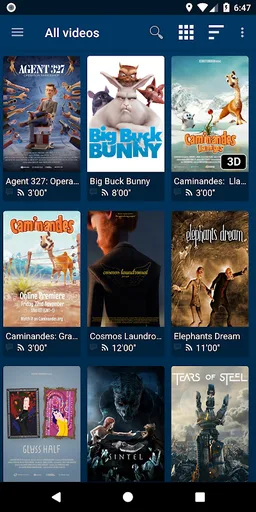
- Videos from all sources integrated in a unified multimedia collection
- Automatic online retrieval of movie and TV show descriptions with posters and backdrops
- Integrated subtitle download
Best player:
- Hardware accelerated video decoding for most devices and video formats
- Multi-audio tracks and mutli-subtitles support
- Supported file formats: MKV, MP4, AVI, WMV, FLV, etc.
- Supported subtitle file types: SRT, SUB, ASS, SMI, etc.
TV friendly:
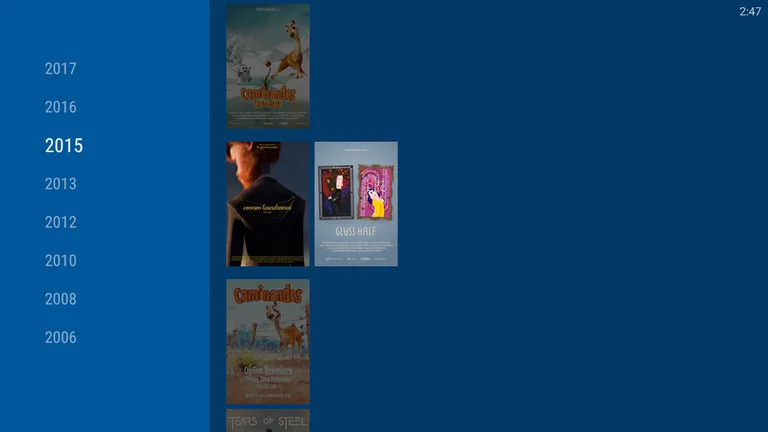
- Dedicated “leanback” user interface for Android TV
- AC3/DTS passthrough (HDMI or S/PDIF) on supported hardware
- 3D support with side-by-side and top-bottom formats playback for 3D TVs
- Audio Boost mode to increase the volume level
- Night Mode to dynamically adjust the volume level
Browse the way you want:
- Instant access to recently added and recently played videos
- Browse movies by name, genre, year, duration, rating
- Browse TV shows by seasons
- Folder browsing supported
And even more:
- Multi-device network video resume
- NFO metadata processing for descriptions and posters
- Scheduled rescan of your network content (Leanback UI only)
- Private mode: temporarily disable playback history recording
- Manually adjust subtitles synchronization
- Manually adjust audio/video synchronization
- Track what your collection and what you have watched via Trakt
Please note that for the application to display and play content, you need to have local video files on your device or add some by indexing network shares.
In case you have an issue or a request about this app, please check our Reddit support community at this address: https://www.reddit.com/r/NovaVideoPlayer
If you experience any issue with video hardware decoding you can force software decoding in the application preferences.
You are welcome to contribute to the translation of the application at https://crowdin.com/project/nova-video-player
NOVA stands for opeN sOurce Video plAyer.
Universal player:
- Play videos from your computer, server (FTP, SFTP, WebDAV), NAS (SMB, UPnP)
- Play videos from external USB storage
- Videos from all sources integrated in a unified multimedia collection
- Automatic online retrieval of movie and TV show descriptions with posters and backdrops
- Integrated subtitle download
Best player:
- Hardware accelerated video decoding for most devices and video formats
- Multi-audio tracks and mutli-subtitles support
- Supported file formats: MKV, MP4, AVI, WMV, FLV, etc.
- Supported subtitle file types: SRT, SUB, ASS, SMI, etc.
TV friendly:
- Dedicated “leanback” user interface for Android TV
- AC3/DTS passthrough (HDMI or S/PDIF) on supported hardware
- 3D support with side-by-side and top-bottom formats playback for 3D TVs
- Audio Boost mode to increase the volume level
- Night Mode to dynamically adjust the volume level
Browse the way you want:
- Instant access to recently added and recently played videos
- Browse movies by name, genre, year, duration, rating
- Browse TV shows by seasons
- Folder browsing supported
And even more:
- Multi-device network video resume
- NFO metadata processing for descriptions and posters
- Scheduled rescan of your network content (Leanback UI only)
- Private mode: temporarily disable playback history recording
- Manually adjust subtitles synchronization
- Manually adjust audio/video synchronization
- Track what your collection and what you have watched via Trakt
Please note that for the application to display and play content, you need to have local video files on your device or add some by indexing network shares.
In case you have an issue or a request about this app, please check our Reddit support community at this address: https://www.reddit.com/r/NovaVideoPlayer
If you experience any issue with video hardware decoding you can force software decoding in the application preferences.
You are welcome to contribute to the translation of the application at https://crowdin.com/project/nova-video-player
NOVA stands for opeN sOurce Video plAyer.
Permissions (22)
NOVA Video Player requests the following Android permissions:
- Access Network State android.permission.ACCESS_NETWORK_STATE
- Access Wifi State android.permission.ACCESS_WIFI_STATE
- Bluetooth Connect android.permission.BLUETOOTH_CONNECT
- Broadcast Sticky android.permission.BROADCAST_STICKY
- Change Wifi Multicast State android.permission.CHANGE_WIFI_MULTICAST_STATE
- Change Wifi State android.permission.CHANGE_WIFI_STATE
- Foreground Service android.permission.FOREGROUND_SERVICE
- Foreground Service Data Sync android.permission.FOREGROUND_SERVICE_DATA_SYNC
- Foreground Service Media Playback android.permission.FOREGROUND_SERVICE_MEDIA_PLAYBACK
- Internet android.permission.INTERNET
- Modify Audio Settings android.permission.MODIFY_AUDIO_SETTINGS
- Post Notifications android.permission.POST_NOTIFICATIONS
- Read Media Images android.permission.READ_MEDIA_IMAGES
- Read Media Video android.permission.READ_MEDIA_VIDEO
- Receive Boot Completed android.permission.RECEIVE_BOOT_COMPLETED
- Record Audio android.permission.RECORD_AUDIO
- System Alert Window android.permission.SYSTEM_ALERT_WINDOW
- Usb Permission android.permission.USB_PERMISSION
- Wake Lock android.permission.WAKE_LOCK
- Com Android Providers Tv Permission Read Epg Data com.android.providers.tv.permission.READ_EPG_DATA
- Com Android Providers Tv Permission Write Epg Data com.android.providers.tv.permission.WRITE_EPG_DATA
- Org Courville Nova Dynamic Receiver Not Exported Permission org.courville.nova.DYNAMIC_RECEIVER_NOT_EXPORTED_PERMISSION