myPOS – Accept card payments
Send bank transfers, accept card payments, send payment requests and more.
iPay International Ltd · eu.mobile.mypos




UpdatedApr 21, 2026
PublishedApr 7, 2021
Packageeu.mobile.mypos
MD5c1010d332fffe8e44b92ac2186ed7bb6
SHA1 (signer)7E:6B:1C:1A:98:FA:CA:BE:13:64:74:6A:72:99:9B:97:97:89:34:4D
Signed byCN=Yavor Petrov, OU=SA, O=iPay International, L=Luxembourg, ST=Luxembourg, C=LU
Architecturesarmeabi-v7a, arm64-v8a
Malware scanTRUSTED
Websitehttp://mypos.eu
Contact[email protected]
Privacy policyView
What's new
Modern interface for faster, more intuitive use
Daily Insights snapshot with sales, fees, and transactions
Manage all transfers in one place
Schedule one-time or recurring transfers
Download statements in multiple formats
Centralised profile with all details and documents
Daily Insights snapshot with sales, fees, and transactions
Manage all transfers in one place
Schedule one-time or recurring transfers
Download statements in multiple formats
Centralised profile with all details and documents
Description
Help your business grow by accepting and managing your payments on the go!
With the myPOS mobile app you can run your business right from your pocket.
Discover a new world of doing business the smart way! From using our online payment acceptance tools such as QR codes and Payment Requests, managing your POS devices and business cards, the myPOS mobile app and its broad range of functionalities will boost your business.
The myPOS mobile app is simple to use and enables you to:
• Monitor your earnings, payments, account balances and payouts
• Open as many accounts with unique IBANs as you need in over 10 currencies
• Transfer money between your accounts and other myPOS users within seconds, 24/7, even on bank holidays
• Send secure Payment Requests directly to your customer’s phone or e-mail address
• Accept QR code payments with the rich Payment Request functionality
• Turn your phone into a powerful POS with MO/TO Virtual Terminal
• Control your credit card machines - activate/deactivate your myPOS devices and track transactions per device in real time
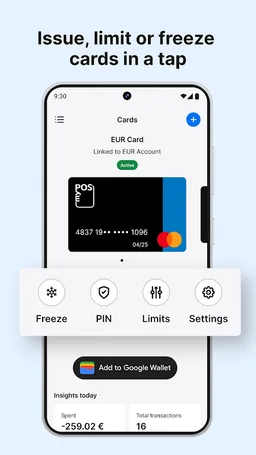
• Order, activate and manage your myPOS business cards
GETTING STARTED WITH myPOS:
1. Download the app and create a myPOS account
2. Complete a short identification process for verification purposes
3. Start accepting payments on the move
If your business needs a mobile POS terminal, you can order your myPOS device at https://www.mypos.com
WHY CHOOSE myPOS:
• No monthly fees, no rental contract
• Free merchant account with IBAN
• Accept all major debit and credit cards
• Instant settlement of received payments
• Free business card for instant access to funds
• No requirements for minimum turnover
• More than 100,000 businesses already trust us!
ABOUT myPOS:
myPOS provides integrated and affordable payment solutions, changing the way businesses accept card payments across all channels - at the counter, online and via mobile devices.
The myPOS package includes a mobile POS device, free myPOS account with business card and access to additional merchant services.
myPOS is the winner of the Best POS Innovation award for 2019 by the MPE Europe, Best B2B Payments Company 2020 by Fintech Breakthrough Awards, Best SME Omnichannel Payments Platform 2020 by the UK Enterprise Awards and in 2021 won the B2B Payments Innovation Award by Fintech Breakthrough Awards.
Find out more at: https://www.mypos.com
With the myPOS mobile app you can run your business right from your pocket.
Discover a new world of doing business the smart way! From using our online payment acceptance tools such as QR codes and Payment Requests, managing your POS devices and business cards, the myPOS mobile app and its broad range of functionalities will boost your business.
The myPOS mobile app is simple to use and enables you to:
• Monitor your earnings, payments, account balances and payouts
• Open as many accounts with unique IBANs as you need in over 10 currencies
• Transfer money between your accounts and other myPOS users within seconds, 24/7, even on bank holidays
• Send secure Payment Requests directly to your customer’s phone or e-mail address
• Accept QR code payments with the rich Payment Request functionality
• Turn your phone into a powerful POS with MO/TO Virtual Terminal
• Control your credit card machines - activate/deactivate your myPOS devices and track transactions per device in real time
• Order, activate and manage your myPOS business cards
GETTING STARTED WITH myPOS:
1. Download the app and create a myPOS account
2. Complete a short identification process for verification purposes
3. Start accepting payments on the move
If your business needs a mobile POS terminal, you can order your myPOS device at https://www.mypos.com
WHY CHOOSE myPOS:
• No monthly fees, no rental contract
• Free merchant account with IBAN
• Accept all major debit and credit cards
• Instant settlement of received payments
• Free business card for instant access to funds
• No requirements for minimum turnover
• More than 100,000 businesses already trust us!
ABOUT myPOS:
myPOS provides integrated and affordable payment solutions, changing the way businesses accept card payments across all channels - at the counter, online and via mobile devices.
The myPOS package includes a mobile POS device, free myPOS account with business card and access to additional merchant services.
myPOS is the winner of the Best POS Innovation award for 2019 by the MPE Europe, Best B2B Payments Company 2020 by Fintech Breakthrough Awards, Best SME Omnichannel Payments Platform 2020 by the UK Enterprise Awards and in 2021 won the B2B Payments Innovation Award by Fintech Breakthrough Awards.
Find out more at: https://www.mypos.com
Required features
- Camera android.hardware.camera
- Camera Front android.hardware.camera.front
- Faketouch android.hardware.faketouch
- Location android.hardware.location
- Screen Portrait android.hardware.screen.portrait
Permissions (44)
myPOS – Accept card payments requests the following Android permissions:
- Access Adservices Ad Id android.permission.ACCESS_ADSERVICES_AD_ID
- Access Adservices Attribution android.permission.ACCESS_ADSERVICES_ATTRIBUTION
- Access Coarse Location android.permission.ACCESS_COARSE_LOCATION
- Access Fine Location android.permission.ACCESS_FINE_LOCATION
- Access Network State android.permission.ACCESS_NETWORK_STATE
- Camera android.permission.CAMERA
- Download Without Notification android.permission.DOWNLOAD_WITHOUT_NOTIFICATION
- Foreground Service android.permission.FOREGROUND_SERVICE
- High Sampling Rate Sensors android.permission.HIGH_SAMPLING_RATE_SENSORS
- Internet android.permission.INTERNET
- Modify Audio Settings android.permission.MODIFY_AUDIO_SETTINGS
- Nfc android.permission.NFC
- Post Notifications android.permission.POST_NOTIFICATIONS
- Read App Badge android.permission.READ_APP_BADGE
- Read Contacts android.permission.READ_CONTACTS
- Read Phone State android.permission.READ_PHONE_STATE
- Receive Boot Completed android.permission.RECEIVE_BOOT_COMPLETED
- Record Audio android.permission.RECORD_AUDIO
- Use Biometric android.permission.USE_BIOMETRIC
- Use Fingerprint android.permission.USE_FINGERPRINT
- Vibrate android.permission.VIBRATE
- Wake Lock android.permission.WAKE_LOCK
- Com Anddoes Launcher Permission Update Count com.anddoes.launcher.permission.UPDATE_COUNT
- C2dm Permission Receive com.google.android.c2dm.permission.RECEIVE
- Finsky Permission Bind Get Install Referrer Service com.google.android.finsky.permission.BIND_GET_INSTALL_REFERRER_SERVICE
- Gms Permission Ad Id com.google.android.gms.permission.AD_ID
- Com Htc Launcher Permission Read Settings com.htc.launcher.permission.READ_SETTINGS
- Com Htc Launcher Permission Update Shortcut com.htc.launcher.permission.UPDATE_SHORTCUT
- Com Huawei Android Launcher Permission Change Badge com.huawei.android.launcher.permission.CHANGE_BADGE
- Com Huawei Android Launcher Permission Read Settings com.huawei.android.launcher.permission.READ_SETTINGS
- Com Huawei Android Launcher Permission Write Settings com.huawei.android.launcher.permission.WRITE_SETTINGS
- Com Majeur Launcher Permission Update Badge com.majeur.launcher.permission.UPDATE_BADGE
- Com Oppo Launcher Permission Read Settings com.oppo.launcher.permission.READ_SETTINGS
- Com Oppo Launcher Permission Write Settings com.oppo.launcher.permission.WRITE_SETTINGS
- Com Sec Android Provider Badge Permission Read com.sec.android.provider.badge.permission.READ
- Com Sec Android Provider Badge Permission Write com.sec.android.provider.badge.permission.WRITE
- Com Sonyericsson Home Permission Broadcast Badge com.sonyericsson.home.permission.BROADCAST_BADGE
- Com Sonymobile Home Permission Provider Insert Badge com.sonymobile.home.permission.PROVIDER_INSERT_BADGE
- Eu Mobile Mypos Dynamic Receiver Not Exported Permission eu.mobile.mypos.DYNAMIC_RECEIVER_NOT_EXPORTED_PERMISSION
- Eu Mobile Mypos Permission C2d Message eu.mobile.mypos.permission.C2D_MESSAGE
- Eu Mobile Mypos Permission Process Push Msg eu.mobile.mypos.permission.PROCESS_PUSH_MSG
- Eu Mobile Mypos Permission Push Provider eu.mobile.mypos.permission.PUSH_PROVIDER
- Me Everything Badger Permission Badge Count Read me.everything.badger.permission.BADGE_COUNT_READ
- Me Everything Badger Permission Badge Count Write me.everything.badger.permission.BADGE_COUNT_WRITE