Millennium bim Smart IZI
Smart IZI is the ideal solution to manage your finances, your Bank in your hand.
Millennium bim · com.ebankit.android.millenniumbim


UpdatedApr 18, 2026
PublishedMar 22, 2021
Packagecom.ebankit.android.millenniumbim
MD57a263d9c5dc3226f3db3a7e028688781
SHA1 (signer)15:DF:BB:35:A5:4F:9A:7A:95:04:0D:57:92:28:9B:6D:A3:2D:A3:33
Signed byCN=Millennium BIM, OU=Millennium BIM, O=Millennium BIM, L=Maputo, ST=Maputo, C=MZ
Architecturesx86, x86-64, armeabi-v7a, arm64-v8a, mips
Malware scanTRUSTED
Contact[email protected]
Privacy policyView
What's new
🚀 What’s New in the App
💳 Credit Cards: It’s now easier to change your payment option and make cash advances, with a fully redesigned layout.
📱 Mobile Wallets: A redesigned experience makes usage more intuitive and effortless.
💳 Credit Cards: It’s now easier to change your payment option and make cash advances, with a fully redesigned layout.
📱 Mobile Wallets: A redesigned experience makes usage more intuitive and effortless.
Description
Navigation mode
The first great feature of this new version is the Look and Feel, which comes along with new colours, layouts, as well as new menus and buttons.
The new Smart IZI layout offers you a different navigation mode from the previous one. Now, after logging in, you can slide to the left or right on the products carousel and have an overview of all your products: accounts, cards, savings and loans. To make it even easier to navigate through the App, the new version of Smart IZI has a fixed navigation bar at the bottom of the screen where you can quickly access to "day-by-day", "transfer", " pay" and "more".
Privacy mode
The new version of Smart IZI brings with it the Privacy mode. Designed to ensure a higher confidentiality level of your financial information. With this new mode, you can always choose whether to hide or not your account balances after authentication.
Quick Access
Because simplifying is "making it more IZI", the new app has quick navigation options in the top right corner of the "day-by-day" feature: Alerts, Settings and Exit button.
Segment Themes/Colors
Now your App can distinguish your segment and define the colours of the visual components according to the Segment to which you belong.
Alerts / Push Notifications
Getting useful information about your assets and news about your Bank has become easier! Simply select the alert icon on the main page. Make sure to access settings first and enable the reception of Push-Notifications.
Settings
In this private area, you can easily:
• View and delete favourites;
• View authorization codes;
• Change the IZI PIN;
• Register / Update e-mail;
• Reset your Internet Banking password * (new);
• Enable / Disable the biometric configuration
• Enable / Disable the reception of Push-Notifications (Alerts)
Products Carousel
Navigating left or right, you will be able to view all your products (accounts, cards, savings, savings and loans) and also perform some specific operations for each product. You can also check movements, balances or details of the specific product by selecting the “More details” option.
Transfer
Performing transfer operations has never been easier, this option is also in the navigation bar. See here the type of transfers available for you:
• Intrabank Transfers
• Interbank Transfers
• Transfer for Phone
• Mobile Transfers
• M-Pesa
• E-Mola * (new);
• Schedules
Pay
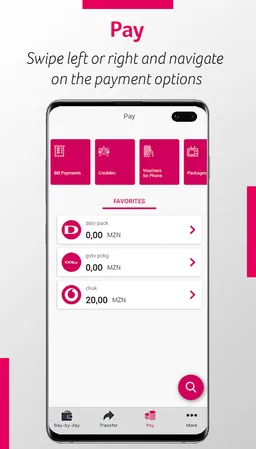
Whenever you want to pay for a service, just click on “Pay” on the navigation bar. Here you can make the following payments:
• Credelec;
• Vouchers for Phone;
• Packages for TV;
• Bill Payments;
• INSS payment * (new);
• Cash Directo.
More
Here we have other no less important operations available to you, such as:
• Read QR Code;
• Generate QR Code;
• Savings
• IZI Withdrawal
• Request Check Book
• Send Invitations (only available to Prestige Customers)
You can also view our Contacts, Branches and the current exchange rate.
Patrimony
You will be able to view your assets and liabilities in a graphic and intuitive way, just by clicking on the Patrimony button right below the product carousel.
Favourites
Paying and transferring can be even faster! Save your favourite transactions and re-use them whenever you want to make a next transaction. To do this, just select the option "Add as Favourite", at the end of the transaction, and that's it!
Access requirements
You can access Smart IZI through any device with the application installed. Use your mobile banking credentials to access the application, namely, cell phone number associated with the channel and the 4-digit access PIN, known as IZI PIN.
Millennium bim. Aqui Consigo.
The first great feature of this new version is the Look and Feel, which comes along with new colours, layouts, as well as new menus and buttons.
The new Smart IZI layout offers you a different navigation mode from the previous one. Now, after logging in, you can slide to the left or right on the products carousel and have an overview of all your products: accounts, cards, savings and loans. To make it even easier to navigate through the App, the new version of Smart IZI has a fixed navigation bar at the bottom of the screen where you can quickly access to "day-by-day", "transfer", " pay" and "more".
Privacy mode
The new version of Smart IZI brings with it the Privacy mode. Designed to ensure a higher confidentiality level of your financial information. With this new mode, you can always choose whether to hide or not your account balances after authentication.
Quick Access
Because simplifying is "making it more IZI", the new app has quick navigation options in the top right corner of the "day-by-day" feature: Alerts, Settings and Exit button.
Segment Themes/Colors
Now your App can distinguish your segment and define the colours of the visual components according to the Segment to which you belong.
Alerts / Push Notifications
Getting useful information about your assets and news about your Bank has become easier! Simply select the alert icon on the main page. Make sure to access settings first and enable the reception of Push-Notifications.
Settings
In this private area, you can easily:
• View and delete favourites;
• View authorization codes;
• Change the IZI PIN;
• Register / Update e-mail;
• Reset your Internet Banking password * (new);
• Enable / Disable the biometric configuration
• Enable / Disable the reception of Push-Notifications (Alerts)
Products Carousel
Navigating left or right, you will be able to view all your products (accounts, cards, savings, savings and loans) and also perform some specific operations for each product. You can also check movements, balances or details of the specific product by selecting the “More details” option.
Transfer
Performing transfer operations has never been easier, this option is also in the navigation bar. See here the type of transfers available for you:
• Intrabank Transfers
• Interbank Transfers
• Transfer for Phone
• Mobile Transfers
• M-Pesa
• E-Mola * (new);
• Schedules
Pay
Whenever you want to pay for a service, just click on “Pay” on the navigation bar. Here you can make the following payments:
• Credelec;
• Vouchers for Phone;
• Packages for TV;
• Bill Payments;
• INSS payment * (new);
• Cash Directo.
More
Here we have other no less important operations available to you, such as:
• Read QR Code;
• Generate QR Code;
• Savings
• IZI Withdrawal
• Request Check Book
• Send Invitations (only available to Prestige Customers)
You can also view our Contacts, Branches and the current exchange rate.
Patrimony
You will be able to view your assets and liabilities in a graphic and intuitive way, just by clicking on the Patrimony button right below the product carousel.
Favourites
Paying and transferring can be even faster! Save your favourite transactions and re-use them whenever you want to make a next transaction. To do this, just select the option "Add as Favourite", at the end of the transaction, and that's it!
Access requirements
You can access Smart IZI through any device with the application installed. Use your mobile banking credentials to access the application, namely, cell phone number associated with the channel and the 4-digit access PIN, known as IZI PIN.
Millennium bim. Aqui Consigo.
Required features
- Faketouch android.hardware.faketouch
- Microphone android.hardware.microphone
- Screen Portrait android.hardware.screen.portrait
Permissions (43)
Millennium bim Smart IZI requests the following Android permissions:
- Access Adservices Ad Id android.permission.ACCESS_ADSERVICES_AD_ID
- Access Adservices Attribution android.permission.ACCESS_ADSERVICES_ATTRIBUTION
- Access Coarse Location android.permission.ACCESS_COARSE_LOCATION
- Access Fine Location android.permission.ACCESS_FINE_LOCATION
- Access Network State android.permission.ACCESS_NETWORK_STATE
- Call Phone android.permission.CALL_PHONE
- Camera android.permission.CAMERA
- Foreground Service android.permission.FOREGROUND_SERVICE
- Internet android.permission.INTERNET
- Modify Audio Settings android.permission.MODIFY_AUDIO_SETTINGS
- Nfc android.permission.NFC
- Post Notifications android.permission.POST_NOTIFICATIONS
- Read App Badge android.permission.READ_APP_BADGE
- Read Contacts android.permission.READ_CONTACTS
- Read External Storage android.permission.READ_EXTERNAL_STORAGE
- Receive Boot Completed android.permission.RECEIVE_BOOT_COMPLETED
- Record Audio android.permission.RECORD_AUDIO
- Use Biometric android.permission.USE_BIOMETRIC
- Use Fingerprint android.permission.USE_FINGERPRINT
- Vibrate android.permission.VIBRATE
- Wake Lock android.permission.WAKE_LOCK
- Write External Storage android.permission.WRITE_EXTERNAL_STORAGE
- Com Anddoes Launcher Permission Update Count com.anddoes.launcher.permission.UPDATE_COUNT
- Com Ebankit Android Millenniumbim Dynamic Receiver Not Exported Permission com.ebankit.android.millenniumbim.DYNAMIC_RECEIVER_NOT_EXPORTED_PERMISSION
- Com Ebankit Android Millenniumbim Permission C2d Message com.ebankit.android.millenniumbim.permission.C2D_MESSAGE
- C2dm Permission Receive com.google.android.c2dm.permission.RECEIVE
- Finsky Permission Bind Get Install Referrer Service com.google.android.finsky.permission.BIND_GET_INSTALL_REFERRER_SERVICE
- Gms Permission Ad Id com.google.android.gms.permission.AD_ID
- Providers Gsf Permission Read Gservices com.google.android.providers.gsf.permission.READ_GSERVICES
- Com Htc Launcher Permission Read Settings com.htc.launcher.permission.READ_SETTINGS
- Com Htc Launcher Permission Update Shortcut com.htc.launcher.permission.UPDATE_SHORTCUT
- Com Huawei Android Launcher Permission Change Badge com.huawei.android.launcher.permission.CHANGE_BADGE
- Com Huawei Android Launcher Permission Read Settings com.huawei.android.launcher.permission.READ_SETTINGS
- Com Huawei Android Launcher Permission Write Settings com.huawei.android.launcher.permission.WRITE_SETTINGS
- Com Majeur Launcher Permission Update Badge com.majeur.launcher.permission.UPDATE_BADGE
- Com Oppo Launcher Permission Read Settings com.oppo.launcher.permission.READ_SETTINGS
- Com Oppo Launcher Permission Write Settings com.oppo.launcher.permission.WRITE_SETTINGS
- Com Sec Android Provider Badge Permission Read com.sec.android.provider.badge.permission.READ
- Com Sec Android Provider Badge Permission Write com.sec.android.provider.badge.permission.WRITE
- Com Sonyericsson Home Permission Broadcast Badge com.sonyericsson.home.permission.BROADCAST_BADGE
- Com Sonymobile Home Permission Provider Insert Badge com.sonymobile.home.permission.PROVIDER_INSERT_BADGE
- Me Everything Badger Permission Badge Count Read me.everything.badger.permission.BADGE_COUNT_READ
- Me Everything Badger Permission Badge Count Write me.everything.badger.permission.BADGE_COUNT_WRITE