Lua Player: Pop-up All format
Powerful multitasking PIP video player! Play 4K videos in a floating window
Lua Interactive · ms.dev.luaplayer_va




UpdatedMar 2, 2026
PublishedAug 30, 2020
Packagems.dev.luaplayer_va
MD5d0c45d689c5bf1b2302aa85028dcf9fd
SHA1 (signer)C1:6F:B2:DA:07:F5:C6:9E:36:79:B3:05:C5:D0:97:A4:D3:3A:66:F6
Signed byCN=Patrick Lua, OU=Lua Interactive, O=Lua Interactive, L=Sydney, ST=NSW
Architecturesx86-64
Malware scanTRUSTED
Contact[email protected]
Privacy policyView
What's new
Added: Ads consent popup
Updated: Improved app performance
Updated: Improved app performance
Description
Experience the most powerful multitasking media player!
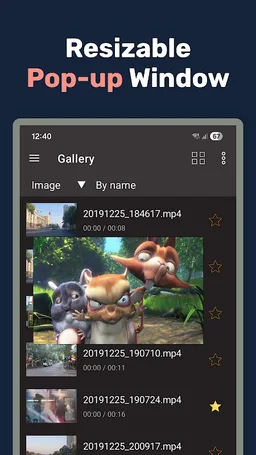
Lua Player is a top-tier media player that supports all formats, high-resolution videos, and subtitles—all within a fully customizable floating window (Picture-in-Picture). Enjoy your favorite content while gaming, chatting, or browsing.
■ Smart Floating Window & Playback Controls
• Ultimate Multitasking: Resize and move the pop-up player anywhere on your screen. Watch videos without interrupting your work.
• Background Playback: Keep the audio or video running even when the app is minimized.
• A-B Repeat: Easily loop specific sections (Point A to Point B) for learning or fun.
• Playback Speed: Adjust speed from 0.3x up to 2.0x to suit your pace.
• Intuitive Gestures: Swipe to control brightness, volume, and video seeking instantly.
• Extra Tools: Supports screen capture, screen rotation, and continuous play for an uninterrupted experience.
■ Universal Support for All Formats & Codecs
• Ultra HD Quality: Seamlessly plays HD, Full HD, and 4K Ultra HD (4k player) videos.
• Video Codecs: H.264, H.265 (HEVC), MPEG4, XVID, VP8, VP9, and more.
• Audio Codecs: AAC, AC3, Vorbis, MP3, FLAC, WMA, etc.
• Network Streaming: Supports RTSP, RTMP, HLS (m3u8), and MMS for live content.
• Multi-Audio: Easily toggle between multiple audio tracks.
■ Advanced Subtitle Management
• Formats: SAMI(.smi), .ssa/.ass, Subrip(.srt), MicroDVD(.sub), and more.
• Total Control: Sync subtitles, replace tracks, and support for both internal/external subtitles.
• Customization: Personalize your viewing with adjustable subtitle color, size, and position.
■ Flexible Display & Theme Settings
• Aspect Ratios: Supports 16:9, 4:3, 21:9, 1:1, and other custom ratios.
• Mirror Mode: Flip video horizontally for dance practice or mirrored viewing.
• Dynamic UI: Change theme colors to match your style.
■ Smart Additional Features
• Network Play (SMB/NAS): Stream media directly from Windows shares or NAS via SMB/CIFS.
• URL Player: Paste any web URL to stream videos directly in the app.
• Easy Management: Search, add, or delete media files and favorites with ease.
■ Permissions Guide
• Read Phone Status: Pauses playback during incoming calls.
• Storage Access: Manages media files and thumbnails.
• Network Access: Enables online streaming.
• Draw Over Other Apps: Essential for the floating window (PIP) functionality.
■
Some of the screens are from the Big Buck Bunny licensed under the Creative Commons Attribution 3.0.
(c) copyright 2008, Blender Foundation / www.bigbuckbunny.org
Some of the screens are from the Sintel licensed under the Creative Commons Attribution 3.0.
(c) copyright Blender Foundation | www.sintel.org
Lua Player is a top-tier media player that supports all formats, high-resolution videos, and subtitles—all within a fully customizable floating window (Picture-in-Picture). Enjoy your favorite content while gaming, chatting, or browsing.
■ Smart Floating Window & Playback Controls
• Ultimate Multitasking: Resize and move the pop-up player anywhere on your screen. Watch videos without interrupting your work.
• Background Playback: Keep the audio or video running even when the app is minimized.
• A-B Repeat: Easily loop specific sections (Point A to Point B) for learning or fun.
• Playback Speed: Adjust speed from 0.3x up to 2.0x to suit your pace.
• Intuitive Gestures: Swipe to control brightness, volume, and video seeking instantly.
• Extra Tools: Supports screen capture, screen rotation, and continuous play for an uninterrupted experience.
■ Universal Support for All Formats & Codecs
• Ultra HD Quality: Seamlessly plays HD, Full HD, and 4K Ultra HD (4k player) videos.
• Video Codecs: H.264, H.265 (HEVC), MPEG4, XVID, VP8, VP9, and more.
• Audio Codecs: AAC, AC3, Vorbis, MP3, FLAC, WMA, etc.
• Network Streaming: Supports RTSP, RTMP, HLS (m3u8), and MMS for live content.
• Multi-Audio: Easily toggle between multiple audio tracks.
■ Advanced Subtitle Management
• Formats: SAMI(.smi), .ssa/.ass, Subrip(.srt), MicroDVD(.sub), and more.
• Total Control: Sync subtitles, replace tracks, and support for both internal/external subtitles.
• Customization: Personalize your viewing with adjustable subtitle color, size, and position.
■ Flexible Display & Theme Settings
• Aspect Ratios: Supports 16:9, 4:3, 21:9, 1:1, and other custom ratios.
• Mirror Mode: Flip video horizontally for dance practice or mirrored viewing.
• Dynamic UI: Change theme colors to match your style.
■ Smart Additional Features
• Network Play (SMB/NAS): Stream media directly from Windows shares or NAS via SMB/CIFS.
• URL Player: Paste any web URL to stream videos directly in the app.
• Easy Management: Search, add, or delete media files and favorites with ease.
■ Permissions Guide
• Read Phone Status: Pauses playback during incoming calls.
• Storage Access: Manages media files and thumbnails.
• Network Access: Enables online streaming.
• Draw Over Other Apps: Essential for the floating window (PIP) functionality.
■
Some of the screens are from the Big Buck Bunny licensed under the Creative Commons Attribution 3.0.
(c) copyright 2008, Blender Foundation / www.bigbuckbunny.org
Some of the screens are from the Sintel licensed under the Creative Commons Attribution 3.0.
(c) copyright Blender Foundation | www.sintel.org
Required features
- Faketouch android.hardware.faketouch
Permissions (22)
Lua Player: Pop-up All format requests the following Android permissions:
- Access Adservices Ad Id android.permission.ACCESS_ADSERVICES_AD_ID
- Access Adservices Attribution android.permission.ACCESS_ADSERVICES_ATTRIBUTION
- Access Adservices Custom Audience android.permission.ACCESS_ADSERVICES_CUSTOM_AUDIENCE
- Access Adservices Topics android.permission.ACCESS_ADSERVICES_TOPICS
- Access Network State android.permission.ACCESS_NETWORK_STATE
- Foreground Service android.permission.FOREGROUND_SERVICE
- Foreground Service Media Playback android.permission.FOREGROUND_SERVICE_MEDIA_PLAYBACK
- Get Tasks android.permission.GET_TASKS
- Internet android.permission.INTERNET
- Post Notifications android.permission.POST_NOTIFICATIONS
- Read External Storage android.permission.READ_EXTERNAL_STORAGE
- Read Media Audio android.permission.READ_MEDIA_AUDIO
- Read Media Video android.permission.READ_MEDIA_VIDEO
- System Alert Window android.permission.SYSTEM_ALERT_WINDOW
- Wake Lock android.permission.WAKE_LOCK
- Write External Storage android.permission.WRITE_EXTERNAL_STORAGE
- Com Android Vending Billing com.android.vending.BILLING
- Com Android Vending Check License com.android.vending.CHECK_LICENSE
- C2dm Permission Receive com.google.android.c2dm.permission.RECEIVE
- Finsky Permission Bind Get Install Referrer Service com.google.android.finsky.permission.BIND_GET_INSTALL_REFERRER_SERVICE
- Gms Permission Ad Id com.google.android.gms.permission.AD_ID
- Ms Dev Luaplayer Va Dynamic Receiver Not Exported Permission ms.dev.luaplayer_va.DYNAMIC_RECEIVER_NOT_EXPORTED_PERMISSION