
Kids Place Parental Control
Kids Mode app: Manage screen time and control which apps kids can use
Kiddoware · com.kiddoware.kidsplace



UpdatedApr 20, 2026
PublishedMar 11, 2021
Packagecom.kiddoware.kidsplace
MD540a4afe090455ed6e5df0f050a6b096c
SHA1 (signer)46:40:A9:D0:9E:3B:97:C3:E2:F4:8B:A1:AC:F1:D8:14:6A:B5:50:8D
Signed byCN=Paresh Joshi, OU=Unknown, O=Unknown, L=Unknown, ST=Unknown, C=Unknown
Malware scanTRUSTED
Websitehttp://www.kiddoware.com
Contact[email protected]
Privacy policyView
What's new
Kids Mode App Update: Upgrade play-age-signalsapi to 0.0.3 for Brazil Digital ECA
Description
Kids Place – Parental Control & Kids Mode
Kids Place is a dedicated Kids Mode app that helps parents create a controlled environment for their children on phones and tablets. With Kids Place, parents can set screen time, and block unapproved apps — giving children a space to play, learn, and explore. Kids Place uses app package names to control access. It does not view or read the content inside apps — blocking is rule-based on approved apps (package names), not on app content.
Key Features of Kids Place
Kids Mode Launcher
Turn your device into a kid-friendly space. Only parent-approved apps appear on the home screen, and kids stay inside Kids Place until you exit with your PIN.
App Control
Decide which apps are visible and usable. Block access to apps you don’t approve.
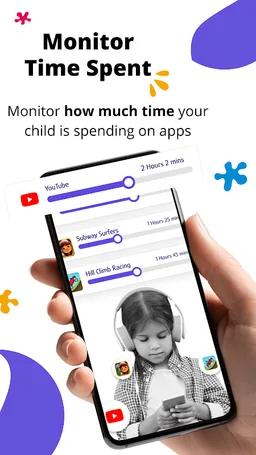
Screen Time Limits
Set daily time limits for the device or for individual apps to encourage healthy digital habits.
Block Purchases & Downloads
Prevent children from making accidental purchases or downloading new apps from the Play Store.
Free Version Includes
Child-friendly launcher and kids space.
Ability to block unapproved apps.
Premium (Optional Subscription/One-Time Purchase) Adds
Profiles: Create different profiles for each child.
Screen time controls: Flexible app and device limits.
Background Mode: Run Kids Place in backgorund mode with stock launcher.
Tamper Protection: Restart on reboot
Important Permissions & Disclosures
Device Administrator Permission (Optional): This permission is requested to make it difficult for children to uninstall the app without a parent's permission, helping to ensure that parental controls remain active on the device.
Accessibility Service Permission(Optional): Used to lock the notification bar and prevent kids from leaving Kids Mode.
Privacy & Security
Kids Place uses above permissions to enforce parental control features. For full details, see our Privacy Policy https://kiddoware.com/kids-place-privacy-policy/
Kids Place is designed to support parents—not replace them. No technology can block 100% of unwanted use, so parental supervision and guidance remain important.
Kids Place is a dedicated Kids Mode app that helps parents create a controlled environment for their children on phones and tablets. With Kids Place, parents can set screen time, and block unapproved apps — giving children a space to play, learn, and explore. Kids Place uses app package names to control access. It does not view or read the content inside apps — blocking is rule-based on approved apps (package names), not on app content.
Key Features of Kids Place
Kids Mode Launcher
Turn your device into a kid-friendly space. Only parent-approved apps appear on the home screen, and kids stay inside Kids Place until you exit with your PIN.
App Control
Decide which apps are visible and usable. Block access to apps you don’t approve.
Screen Time Limits
Set daily time limits for the device or for individual apps to encourage healthy digital habits.
Block Purchases & Downloads
Prevent children from making accidental purchases or downloading new apps from the Play Store.
Free Version Includes
Child-friendly launcher and kids space.
Ability to block unapproved apps.
Premium (Optional Subscription/One-Time Purchase) Adds
Profiles: Create different profiles for each child.
Screen time controls: Flexible app and device limits.
Background Mode: Run Kids Place in backgorund mode with stock launcher.
Tamper Protection: Restart on reboot
Important Permissions & Disclosures
Device Administrator Permission (Optional): This permission is requested to make it difficult for children to uninstall the app without a parent's permission, helping to ensure that parental controls remain active on the device.
Accessibility Service Permission(Optional): Used to lock the notification bar and prevent kids from leaving Kids Mode.
Privacy & Security
Kids Place uses above permissions to enforce parental control features. For full details, see our Privacy Policy https://kiddoware.com/kids-place-privacy-policy/
Kids Place is designed to support parents—not replace them. No technology can block 100% of unwanted use, so parental supervision and guidance remain important.
Required features
- Faketouch android.hardware.faketouch
- Screen Portrait android.hardware.screen.portrait
- Wifi android.hardware.wifi
Permissions (34)
Kids Place Parental Control requests the following Android permissions:
- Access Network State android.permission.ACCESS_NETWORK_STATE
- Access Wifi State android.permission.ACCESS_WIFI_STATE
- Change Network State android.permission.CHANGE_NETWORK_STATE
- Change Wifi State android.permission.CHANGE_WIFI_STATE
- Expand Status Bar android.permission.EXPAND_STATUS_BAR
- Foreground Service android.permission.FOREGROUND_SERVICE
- Foreground Service Media Playback android.permission.FOREGROUND_SERVICE_MEDIA_PLAYBACK
- Foreground Service Remote Messaging android.permission.FOREGROUND_SERVICE_REMOTE_MESSAGING
- Get Tasks android.permission.GET_TASKS
- Internet android.permission.INTERNET
- Kill Background Processes android.permission.KILL_BACKGROUND_PROCESSES
- Package Usage Stats android.permission.PACKAGE_USAGE_STATS
- Post Notifications android.permission.POST_NOTIFICATIONS
- Query All Packages android.permission.QUERY_ALL_PACKAGES
- Receive Boot Completed android.permission.RECEIVE_BOOT_COMPLETED
- Request Ignore Battery Optimizations android.permission.REQUEST_IGNORE_BATTERY_OPTIMIZATIONS
- Restart Packages android.permission.RESTART_PACKAGES
- Set Wallpaper android.permission.SET_WALLPAPER
- System Alert Window android.permission.SYSTEM_ALERT_WINDOW
- System Overlay Window android.permission.SYSTEM_OVERLAY_WINDOW
- Use Biometric android.permission.USE_BIOMETRIC
- Use Fingerprint android.permission.USE_FINGERPRINT
- Wake Lock android.permission.WAKE_LOCK
- Write Settings android.permission.WRITE_SETTINGS
- Com Android Vending Billing com.android.vending.BILLING
- C2dm Permission Receive com.google.android.c2dm.permission.RECEIVE
- Finsky Permission Bind Get Install Referrer Service com.google.android.finsky.permission.BIND_GET_INSTALL_REFERRER_SERVICE
- Providers Gsf Permission Read Gservices com.google.android.providers.gsf.permission.READ_GSERVICES
- Com Kiddoware Kidsplace Dynamic Receiver Not Exported Permission com.kiddoware.kidsplace.DYNAMIC_RECEIVER_NOT_EXPORTED_PERMISSION
- Com Kiddoware Kidsplace Kpservice Permission Access com.kiddoware.kidsplace.KPService.permission.Access
- Com Kiddoware Kidsplace Permission Current Running App com.kiddoware.kidsplace.permission.CURRENT_RUNNING_APP
- Com Kiddoware Kidsvideoplayer Kidsvideoplayerprovider Read com.kiddoware.kidsvideoplayer.kidsvideoplayerprovider.READ
- Com Kiddoware Kidsvideoplayer Kidsvideoplayerprovider Read Write com.kiddoware.kidsvideoplayer.kidsvideoplayerprovider.READ_WRITE
- Com Kiddoware Kidsvideoplayer Permission Access Select Videos com.kiddoware.kidsvideoplayer.permission.ACCESS_SELECT_VIDEOS