
Hi Browser-Private&Fast web
Hi Browser meets private video downloader,safe web browser and adblock features.
Dating Group · com.talpa.hibrowser




UpdatedNov 5, 2025
PublishedJan 10, 2022
Packagecom.talpa.hibrowser
MD577b42bfb78a30c79524577b51a12a784
SHA1 (signer)94:CD:22:D5:04:05:91:90:FE:F6:48:98:F1:6B:98:8D:28:51:B6:CB
Signed byCN=Talpa Browser, OU=Talpa Browser, O=Talpa Browser
Architecturesarmeabi-v7a, arm64-v8a
Malware scanTRUSTED
Contact[email protected]
Privacy policyView
Description
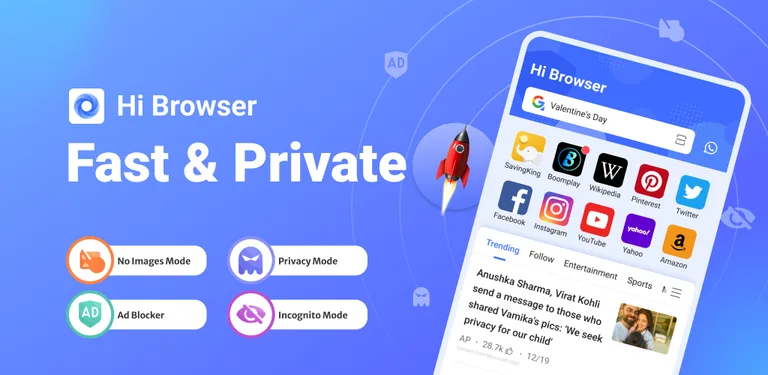
Hi Browser is your private browser and mobile desktop browser with custom news recommendation, free video downloader, ad blocker, and quick scan web pages that help you save mobile data, also protect your private information.
😀Why choose Hi Browser?
√The free ad blocker can block annoying ads when you search in Hi browser and help you implement safe and free Adblock.
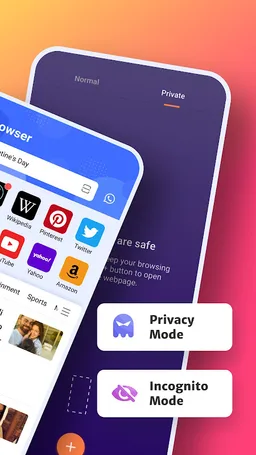
√Incognito browsing mode that you can conduct the private search as a private browser and keep your privacy protected all the time.
√Dark web mode gives you a better experience in a low-light environment. √Video downloader to play and download wonderful and favorite videos with AdBlock as you like.
√Private incognito browser mode to freely browse and search for information.
√Breaking news recommendations keep you up to date on local news.
-------All Functions-------
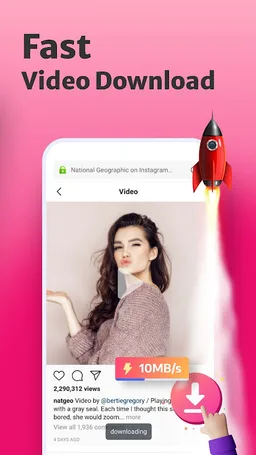
⭐Smart Video Downloader
Fast and Easy
With Hi browser which is a multifunction private browser that has fast and free video sniffer, you can download easily and quickly all videos and movies from mainstream websites and any social media application, like
Instagram, WhatsApp, Telegram, Snapchat, and Facebook to your devices.
⭐AD Blocker
Safe and Private
A plug-ins-free adblocker blocks ads that prevent your privacy from being invaded and Adblock stop ads impact your user experience on hi browser, also incognito keeps you from being tracked on the web browser.
⭐Fast web page search
Convenient and Quick
By enabling quick web search for notification panel in settings, you can incognito and private search directly and safely in the notification panel.
⭐No Images mode
Fast and Economical
Web browser with No Images mode will help you save your mobile data and money in the hi browser, also implement the private browser experience.
⭐Incognito Mode
Safe and Privacy
The private hi browser has Incognito mode that allows you to browse and search the web pages privacy and incognito without leaving any search or browsing history.
⭐Bookmark management
Customized and Fast
Bookmark web pages at any time and visit your favorite web with one tap.
⭐Night mode
Protect your eyes
Turn on the Night mode for a great visual search experience when you browse web pages in low-light environments.
-------Q&A-------
1.How to turn on incognito mode on hi browser?
Open the Me tab in hi browser, “Incognito” will appear on the screen page, click the button on the right to open incognito mode. Incognito mode can protect your privacy.
2.How to use the video downloader?
Search the video or movie you want to download, there will be a download button below the video, click the download button to launch the video downloader then you can watch it in the hi browser.
3.Why use adblocker?
Hi browser is a safe and private browser with a free ad blocker, search with adblocker allows the web pages to load faster and reduce annoying ads on the web, also can save your data and money.
4.What kind of video can be downloaded in hi browser?
Hi Browser’s video sniffer can automatically identify the media resources in the URL. You can download videos on social media channels like Instagram, Facebook, WhatsApp, and so on, also use video downloader to download the favorite movies and interesting videos you searched on the web.
😀Why choose Hi Browser?
√The free ad blocker can block annoying ads when you search in Hi browser and help you implement safe and free Adblock.
√Incognito browsing mode that you can conduct the private search as a private browser and keep your privacy protected all the time.
√Dark web mode gives you a better experience in a low-light environment. √Video downloader to play and download wonderful and favorite videos with AdBlock as you like.
√Private incognito browser mode to freely browse and search for information.
√Breaking news recommendations keep you up to date on local news.
-------All Functions-------
⭐Smart Video Downloader
Fast and Easy
With Hi browser which is a multifunction private browser that has fast and free video sniffer, you can download easily and quickly all videos and movies from mainstream websites and any social media application, like
Instagram, WhatsApp, Telegram, Snapchat, and Facebook to your devices.
⭐AD Blocker
Safe and Private
A plug-ins-free adblocker blocks ads that prevent your privacy from being invaded and Adblock stop ads impact your user experience on hi browser, also incognito keeps you from being tracked on the web browser.
⭐Fast web page search
Convenient and Quick
By enabling quick web search for notification panel in settings, you can incognito and private search directly and safely in the notification panel.
⭐No Images mode
Fast and Economical
Web browser with No Images mode will help you save your mobile data and money in the hi browser, also implement the private browser experience.
⭐Incognito Mode
Safe and Privacy
The private hi browser has Incognito mode that allows you to browse and search the web pages privacy and incognito without leaving any search or browsing history.
⭐Bookmark management
Customized and Fast
Bookmark web pages at any time and visit your favorite web with one tap.
⭐Night mode
Protect your eyes
Turn on the Night mode for a great visual search experience when you browse web pages in low-light environments.
-------Q&A-------
1.How to turn on incognito mode on hi browser?
Open the Me tab in hi browser, “Incognito” will appear on the screen page, click the button on the right to open incognito mode. Incognito mode can protect your privacy.
2.How to use the video downloader?
Search the video or movie you want to download, there will be a download button below the video, click the download button to launch the video downloader then you can watch it in the hi browser.
3.Why use adblocker?
Hi browser is a safe and private browser with a free ad blocker, search with adblocker allows the web pages to load faster and reduce annoying ads on the web, also can save your data and money.
4.What kind of video can be downloaded in hi browser?
Hi Browser’s video sniffer can automatically identify the media resources in the URL. You can download videos on social media channels like Instagram, Facebook, WhatsApp, and so on, also use video downloader to download the favorite movies and interesting videos you searched on the web.
Required features
- Bluetooth android.hardware.bluetooth
- Camera android.hardware.camera
- Camera Autofocus android.hardware.camera.autofocus
- Faketouch android.hardware.faketouch
- Location android.hardware.location
- Microphone android.hardware.microphone
- Screen Portrait android.hardware.screen.portrait
- Wifi android.hardware.wifi
Permissions (57)
Hi Browser-Private&Fast web requests the following Android permissions:
- Sensor Accelerometer android.hardware.sensor.accelerometer
- Access Coarse Location android.permission.ACCESS_COARSE_LOCATION
- Access Fine Location android.permission.ACCESS_FINE_LOCATION
- Access Network State android.permission.ACCESS_NETWORK_STATE
- Access Wifi State android.permission.ACCESS_WIFI_STATE
- Bluetooth android.permission.BLUETOOTH
- Camera android.permission.CAMERA
- Change Network State android.permission.CHANGE_NETWORK_STATE
- Change Wifi State android.permission.CHANGE_WIFI_STATE
- Disable Keyguard android.permission.DISABLE_KEYGUARD
- Expand Status Bar android.permission.EXPAND_STATUS_BAR
- Foreground Service android.permission.FOREGROUND_SERVICE
- Get Accounts android.permission.GET_ACCOUNTS
- Internet android.permission.INTERNET
- Manage External Storage android.permission.MANAGE_EXTERNAL_STORAGE
- Modify Audio Settings android.permission.MODIFY_AUDIO_SETTINGS
- Nfc android.permission.NFC
- Peers Mac Address android.permission.PEERS_MAC_ADDRESS
- Perform Dexopt android.permission.PERFORM_DEXOPT
- Post Notifications android.permission.POST_NOTIFICATIONS
- Query All Packages android.permission.QUERY_ALL_PACKAGES
- Read External Storage android.permission.READ_EXTERNAL_STORAGE
- Read Settings android.permission.READ_SETTINGS
- Read Sync Settings android.permission.READ_SYNC_SETTINGS
- Real Get Tasks android.permission.REAL_GET_TASKS
- Record Audio android.permission.RECORD_AUDIO
- Reorder Tasks android.permission.REORDER_TASKS
- Request Install Packages android.permission.REQUEST_INSTALL_PACKAGES
- Root Recovery State android.permission.ROOT_RECOVERY_STATE
- Set Wallpaper android.permission.SET_WALLPAPER
- Start Any Activity android.permission.START_ANY_ACTIVITY
- Stop App Switches android.permission.STOP_APP_SWITCHES
- System Alert Window android.permission.SYSTEM_ALERT_WINDOW
- Vibrate android.permission.VIBRATE
- Wake Lock android.permission.WAKE_LOCK
- Write External Storage android.permission.WRITE_EXTERNAL_STORAGE
- Write Media Storage android.permission.WRITE_MEDIA_STORAGE
- Write Settings android.permission.WRITE_SETTINGS
- Write Sync Settings android.permission.WRITE_SYNC_SETTINGS
- Android Webkit Permissionrequest android.webkit.PermissionRequest
- Com Android Browser Permission Read History Bookmarks com.android.browser.permission.READ_HISTORY_BOOKMARKS
- Com Android Browser Permission Write History Bookmarks com.android.browser.permission.WRITE_HISTORY_BOOKMARKS
- Com Android Launcher Permission Install Shortcut com.android.launcher.permission.INSTALL_SHORTCUT
- Com Android Launcher Permission Read Settings com.android.launcher.permission.READ_SETTINGS
- Com Android Launcher Permission Uninstall Shortcut com.android.launcher.permission.UNINSTALL_SHORTCUT
- C2dm Permission Receive com.google.android.c2dm.permission.RECEIVE
- Finsky Permission Bind Get Install Referrer Service com.google.android.finsky.permission.BIND_GET_INSTALL_REFERRER_SERVICE
- Gms Permission Ad Id com.google.android.gms.permission.AD_ID
- Providers Gsf Permission Read Gservices com.google.android.providers.gsf.permission.READ_GSERVICES
- Com Transsion Dataservice Permission Read com.transsion.dataservice.permission.READ
- Com Transsion Dataservice Permission Write com.transsion.dataservice.permission.WRITE
- Com Transsion Permission Access All Downloads com.transsion.permission.ACCESS_ALL_DOWNLOADS
- Com Transsion Permission Access Download Manager com.transsion.permission.ACCESS_DOWNLOAD_MANAGER
- Com Transsion Permission Access Download Manager Advanced com.transsion.permission.ACCESS_DOWNLOAD_MANAGER_ADVANCED
- Com Transsion Permission Send Download Completed Intents com.transsion.permission.SEND_DOWNLOAD_COMPLETED_INTENTS
- Com Transsion Tpush Permission Read Provider com.transsion.tpush.permission.READ_PROVIDER
- Com Transsion Tpush Permission Write Provider com.transsion.tpush.permission.WRITE_PROVIDER