Grid Photo Collage Edit, Video
Creative collage, photo and video grid, smart batch editing in Quick Grid!
Magic Photos · mobi.charmer.collagequick




UpdatedFeb 11, 2026
PublishedOct 30, 2020
Packagemobi.charmer.collagequick
MD5dc865bca0606b2beb15d0eb0d0a9c67d
SHA1 (signer)E2:E3:5C:28:42:D6:25:26:32:5B:08:94:9F:14:63:84:DE:11:E9:91
Signed byCN=CQ, OU=charmingapps, O=charmingapps, L=Beijing
Architecturesarmeabi-v7a, arm64-v8a
Malware scanTRUSTED
Contact[email protected]
Privacy policyView
What's new
✅ Important Text Feature Update
– Fully fixed long-standing text display issues, including Thai, Hindi, and Arabic.
– Optimised Arabic (RTL) layout and rendering in the text feature.
– Text input and editing are now more stable and accurate.
– Fully fixed long-standing text display issues, including Thai, Hindi, and Arabic.
– Optimised Arabic (RTL) layout and rendering in the text feature.
– Text input and editing are now more stable and accurate.
Description
QuickGrid – Your Photo Collage Maker for Celebrating Life's Sweet Moments!
Just select photos or videos from your gallery, and QuickGrid will instantly turn them into stunning collage. Customize with your favorite picture layout, effect, filter, sticker, and text to create a unique photo collage maker up to 100 photos, or make video grid in seconds.
Grid 9.0 is now live, the brand-new update of the year! A holiday gift. The newly introduced draft feature lets you unlimited save drafts. No project limits. You can freely undo/redo, and edits are automatically saved. Layouts now feature new adjustment methods, making it easier to arrange layouts and make your collage stand out. In addition, videos also support volume adjustment, letting you control the sound anytime. This update lets you unleash your creativity and create beautiful works of art.
Feature Highlights:
◆ Photo collage maker up to 100 photos.
◆ Mix up to 20 videos to create video collage.
◆ Includes over 500 free collage layouts and 50+ effects & filters.
◆ Includes over 100 photo templates.
◆ The collage allows images or the entire layout to be moved, scaled, and rotated.
◆ Supports adding PNG transparent background for making stickers, overlays, and creative collages.
◆ Huge selection of stickers to enhance your edits.
◆ Easily edit photo with beautiful fonts and curved text.
◆ Choose from over 200 free fonts.
◆ Save in Ultra HD quality.
With QuickGrid, you can effortlessly meet all your photo and video editing needs in one app.
🖼 Basic Collage & Grid
Easily adjust photo grid collage margins, effects, and rounded corners, and use touch controls to scale, move, and rotate your images. Customize the grid layout ratio, borders, and backgrounds to create photo and video collage within seconds. And place the photo grid directly in your Instagram feed.
🖼️ Carousel Posts & Mult-Edit
Carousel is specially designed for ins posts, making it perfect for scrl and seamless carousels. Just select your photo or video editing, and scroll to create a scroll carousel. Mult-Edit lets you batch edit multiple photos and videos at once and save them with a single tap. At the same time, you can also preview for Ins feed, easily create Instagram slideshows.
📸 Photo & Video Editor
The all-in-one photo editor app offers tools like cropping, filters, Giphy stickers, text, and photo frames. Create stunning photo mixes with ease, and take your videos to the next level with versatile video grid editing.Whether you prefer the style photo grid 2025 or classic collage layouts, QuickGrid has everything you need.
📸 Photo Video Maker With Music
Create stunning photo slideshows with music and seamless transitions, effortlessly turning your special moments into videos.
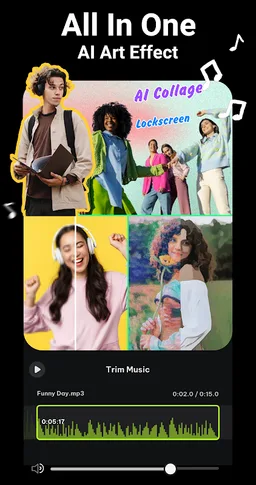
🌟 AI Photo Editor & AI Collage
You can easily remove backgrounds from up to 15 pictures and remix them into beautiful photo collages. The AI tools include Cartoon Enhancer, Art Effect, AI Enhancement, and Low-light Boost to create amazing photo effect.
🎨 Freestyle & Aesthetic Collage
You can freely combine text, stickers, doodles and layouts to carefully create collages in styles like Torn Paper, Newspaper Collage, and Journal Aesthetic, expressing their personal style and aesthetic, and then share their cre ations on Ins or Snapchat Stories.
QuickGrid is a easy-to-use photo collage maker apps. With the free photo collage editing and video grids feature, easily create stylish collages. Come download QuickGrid and turn your moment into amazing posts to share with everyone!
Email: [email protected]
Just select photos or videos from your gallery, and QuickGrid will instantly turn them into stunning collage. Customize with your favorite picture layout, effect, filter, sticker, and text to create a unique photo collage maker up to 100 photos, or make video grid in seconds.
Grid 9.0 is now live, the brand-new update of the year! A holiday gift. The newly introduced draft feature lets you unlimited save drafts. No project limits. You can freely undo/redo, and edits are automatically saved. Layouts now feature new adjustment methods, making it easier to arrange layouts and make your collage stand out. In addition, videos also support volume adjustment, letting you control the sound anytime. This update lets you unleash your creativity and create beautiful works of art.
Feature Highlights:
◆ Photo collage maker up to 100 photos.
◆ Mix up to 20 videos to create video collage.
◆ Includes over 500 free collage layouts and 50+ effects & filters.
◆ Includes over 100 photo templates.
◆ The collage allows images or the entire layout to be moved, scaled, and rotated.
◆ Supports adding PNG transparent background for making stickers, overlays, and creative collages.
◆ Huge selection of stickers to enhance your edits.
◆ Easily edit photo with beautiful fonts and curved text.
◆ Choose from over 200 free fonts.
◆ Save in Ultra HD quality.
With QuickGrid, you can effortlessly meet all your photo and video editing needs in one app.
🖼 Basic Collage & Grid
Easily adjust photo grid collage margins, effects, and rounded corners, and use touch controls to scale, move, and rotate your images. Customize the grid layout ratio, borders, and backgrounds to create photo and video collage within seconds. And place the photo grid directly in your Instagram feed.
🖼️ Carousel Posts & Mult-Edit
Carousel is specially designed for ins posts, making it perfect for scrl and seamless carousels. Just select your photo or video editing, and scroll to create a scroll carousel. Mult-Edit lets you batch edit multiple photos and videos at once and save them with a single tap. At the same time, you can also preview for Ins feed, easily create Instagram slideshows.
📸 Photo & Video Editor
The all-in-one photo editor app offers tools like cropping, filters, Giphy stickers, text, and photo frames. Create stunning photo mixes with ease, and take your videos to the next level with versatile video grid editing.Whether you prefer the style photo grid 2025 or classic collage layouts, QuickGrid has everything you need.
📸 Photo Video Maker With Music
Create stunning photo slideshows with music and seamless transitions, effortlessly turning your special moments into videos.
🌟 AI Photo Editor & AI Collage
You can easily remove backgrounds from up to 15 pictures and remix them into beautiful photo collages. The AI tools include Cartoon Enhancer, Art Effect, AI Enhancement, and Low-light Boost to create amazing photo effect.
🎨 Freestyle & Aesthetic Collage
You can freely combine text, stickers, doodles and layouts to carefully create collages in styles like Torn Paper, Newspaper Collage, and Journal Aesthetic, expressing their personal style and aesthetic, and then share their cre ations on Ins or Snapchat Stories.
QuickGrid is a easy-to-use photo collage maker apps. With the free photo collage editing and video grids feature, easily create stylish collages. Come download QuickGrid and turn your moment into amazing posts to share with everyone!
Email: [email protected]
Required features
- Camera android.hardware.camera
- Faketouch android.hardware.faketouch
- Screen Portrait android.hardware.screen.portrait
- Wifi android.hardware.wifi
Permissions (22)
Grid Photo Collage Edit, Video requests the following Android permissions:
- Access Adservices Ad Id android.permission.ACCESS_ADSERVICES_AD_ID
- Access Adservices Attribution android.permission.ACCESS_ADSERVICES_ATTRIBUTION
- Access Adservices Topics android.permission.ACCESS_ADSERVICES_TOPICS
- Access Network State android.permission.ACCESS_NETWORK_STATE
- Access Wifi State android.permission.ACCESS_WIFI_STATE
- Camera android.permission.CAMERA
- Foreground Service android.permission.FOREGROUND_SERVICE
- Interact Across Users Full android.permission.INTERACT_ACROSS_USERS_FULL
- Internet android.permission.INTERNET
- Read External Storage android.permission.READ_EXTERNAL_STORAGE
- Read Media Audio android.permission.READ_MEDIA_AUDIO
- Read Media Images android.permission.READ_MEDIA_IMAGES
- Read Media Video android.permission.READ_MEDIA_VIDEO
- Receive User Present android.permission.RECEIVE_USER_PRESENT
- Vibrate android.permission.VIBRATE
- Wake Lock android.permission.WAKE_LOCK
- Write External Storage android.permission.WRITE_EXTERNAL_STORAGE
- Com Android Vending Billing com.android.vending.BILLING
- Com Android Vending Check License com.android.vending.CHECK_LICENSE
- Finsky Permission Bind Get Install Referrer Service com.google.android.finsky.permission.BIND_GET_INSTALL_REFERRER_SERVICE
- Gms Permission Ad Id com.google.android.gms.permission.AD_ID
- Mobi Charmer Collagequick Dynamic Receiver Not Exported Permission mobi.charmer.collagequick.DYNAMIC_RECEIVER_NOT_EXPORTED_PERMISSION