



UpdatedOct 29, 2024
PublishedSep 14, 2020
Packagecom.avrapps.documentscanner
MD5b9ec7c5df6edb6e52d8d02a540ef34f6
SHA1 (signer)1E:22:A4:1C:3D:92:46:71:AA:9A:76:BF:68:88:5B:DD:16:76:66:80
Signed byCN=Android, OU=Android, O=Google Inc., L=Mountain View, ST=California, C=US
Architecturesarmeabi-v7a
Malware scanTRUSTED
Contact[email protected]
Privacy policyView
What's new
* Added new image enhancements
* Fixed issue with drive backup for some devices
* Fixed issue with drive backup for some devices
Description
Document Scanner helps you to digitalise your content (ID/Business cards,Papers,PhotoCopies specially). You scan, store, sync and share your scanned copies to anyone with a smartphone or computer
Features:
*Quickly Digitise Document
Just use your phone camera to scan and digitise all kinds of paper documents: receipts, notes, invoices, whiteboard discussions, business cards, certificates, etc. with handy options like smart cropping and auto enhancing
*Excellent Scan Quality
Advanced options that makes you feel like your images are scanned by a Scanner device
* Scan the document text (OCR)
OCR (optical character recognition) feature recognises texts in document images and extract them from images.
*Share your scanned files
Easily share documents in PDF or JPEG format with friends via various ways: post on social media, send attachment or document download link through email.
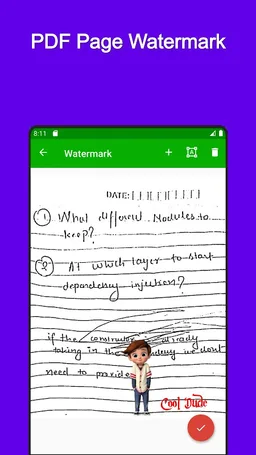
*Sign your scanned files
Add customised watermarks or digitally sign them to mark your own documents.
*Backup and Sync
We only store your content to your google drive(You too can see that) and helps you to restore at anytime with a single click.
Features:
*Quickly Digitise Document
Just use your phone camera to scan and digitise all kinds of paper documents: receipts, notes, invoices, whiteboard discussions, business cards, certificates, etc. with handy options like smart cropping and auto enhancing
*Excellent Scan Quality
Advanced options that makes you feel like your images are scanned by a Scanner device
* Scan the document text (OCR)
OCR (optical character recognition) feature recognises texts in document images and extract them from images.
*Share your scanned files
Easily share documents in PDF or JPEG format with friends via various ways: post on social media, send attachment or document download link through email.
*Sign your scanned files
Add customised watermarks or digitally sign them to mark your own documents.
*Backup and Sync
We only store your content to your google drive(You too can see that) and helps you to restore at anytime with a single click.
Required features
- Camera android.hardware.camera
- Faketouch android.hardware.faketouch
Permissions (6)
Document Scanner Pro - PDF Creation requests the following Android permissions:
- Access Network State android.permission.ACCESS_NETWORK_STATE
- Camera android.permission.CAMERA
- Foreground Service android.permission.FOREGROUND_SERVICE
- Internet android.permission.INTERNET
- Read External Storage android.permission.READ_EXTERNAL_STORAGE
- Write External Storage android.permission.WRITE_EXTERNAL_STORAGE