Cyber Watch Face
Futuristic and digital watch face for Wear OS smartwatches
RichFace · watch.richface.androidwear.cyber


UpdatedJun 7, 2024
PublishedAug 10, 2021
Packagewatch.richface.androidwear.cyber
MD5a47564687f3c1ec1c26156109fc0d78d
SHA1 (signer)FA:6F:11:27:55:A8:99:35:41:DA:7F:F4:2F:96:77:A3:57:EC:BF:19
Signed byCN=Android, OU=Android, O=Google Inc., L=Mountain View, ST=California, C=US
Malware scanTRUSTED
Websitehttp://www.richface.watch/
Contact[email protected]
Privacy policyView
What's new
Improved performance
Description
★ Cyber Watch Face Watch Face is fully Wear OS supported
NEW! Cyber Watch Face for Wear OS is full of digital interactive functions.
WatchFace contains a huge number and user-friendly settings on the watch and the phone companion app.
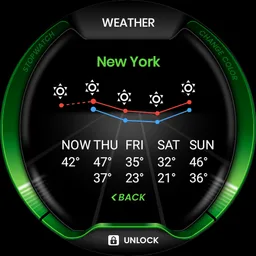
The watch face contains 3 tap targets on the screen and you can customize them to be more informative which includes various numbers of data such as battery level status, FIT data, weather information, etc..
The Wear OS comes with external complication which this watch face supports completely.
The watch face contains free and premium features. Premium features should be unlocked to use them.
★ How to select shortcuts in the position (complication) ★
- Long tap on the watch face
- System shows icon "gear" for the watch face settings. Tap on it
- Select "Customize" option
- Select "Complications" option
- Select desired position
- Select "External Complication"
- Find "General" from list and select it
- Select "App shortcut" and choose desired app
You are ready to go.
★ WEAR OS integration
• Fully standalone! (iPhone and Android compatible)
• External complication data for the indicators
★ Compatible with all Wear OS smartwatches
• External complications
• Change color (Free)
• 24 hour format (Free)
• Leading zero (Free)
• Screen time (Free)
• Forecast (Premium)
• Full ambient mode option (Free)
• Change a color preset (Free)
• Tap indicator (Free)
• Google FIT integration (Premium)
• Weather settings (location, providers, frequency update, units) (Premium)
★ NEW ★
• Vibrate on every hour
★ Built-in complications:
• Weather (Free)
• Forecast (Premium)
• Watch battery (Free)
• Steps (Google Fit) (Premium)
• Distance (Google Fit) (Premium)
• Walking (Google Fit) (Premium)
• Running (Google Fit) (Premium)
• Biking (Google Fit) (Premium)
• Calories (Google Fit) (Premium)
• Fit statistics (Google Fit) (Premium)
• HeartRate detector (Google Fit) (Premium)
• Water counter (Free)
• Coffee counter (Free)
• Steps counter from wear device (built-in steps) (Free)
★★★ DISCLAIMER: ★★★
The watch face is standalone app but the complication for phone battery requires a connection with the companion app on Android phone devices. iPhone users can not have this data due to iOS limitation.
To get Google Fit activity data, please connect to Google Fit via watch face settings or companion app.
★ FAQ
!! Please contact us if you have any trouble with the app !!
[email protected]
How do I install the watch face on Wear OS ?
1. Install it from Google Play Wear Store on your watch.
2. Install the companion app for fully customization (Android phone devices).
The watch face CANNOT be installed on smartwatches with TizenOS (Samsung Gear 2, 3, Galaxy Watch, ...) or any other OS except Wear OS
★ PERMISSIONS Explained
https://www.richface.watch/privacy
NEW! Cyber Watch Face for Wear OS is full of digital interactive functions.
WatchFace contains a huge number and user-friendly settings on the watch and the phone companion app.
The watch face contains 3 tap targets on the screen and you can customize them to be more informative which includes various numbers of data such as battery level status, FIT data, weather information, etc..
The Wear OS comes with external complication which this watch face supports completely.
The watch face contains free and premium features. Premium features should be unlocked to use them.
★ How to select shortcuts in the position (complication) ★
- Long tap on the watch face
- System shows icon "gear" for the watch face settings. Tap on it
- Select "Customize" option
- Select "Complications" option
- Select desired position
- Select "External Complication"
- Find "General" from list and select it
- Select "App shortcut" and choose desired app
You are ready to go.
★ WEAR OS integration
• Fully standalone! (iPhone and Android compatible)
• External complication data for the indicators
★ Compatible with all Wear OS smartwatches
• External complications
• Change color (Free)
• 24 hour format (Free)
• Leading zero (Free)
• Screen time (Free)
• Forecast (Premium)
• Full ambient mode option (Free)
• Change a color preset (Free)
• Tap indicator (Free)
• Google FIT integration (Premium)
• Weather settings (location, providers, frequency update, units) (Premium)
★ NEW ★
• Vibrate on every hour
★ Built-in complications:
• Weather (Free)
• Forecast (Premium)
• Watch battery (Free)
• Steps (Google Fit) (Premium)
• Distance (Google Fit) (Premium)
• Walking (Google Fit) (Premium)
• Running (Google Fit) (Premium)
• Biking (Google Fit) (Premium)
• Calories (Google Fit) (Premium)
• Fit statistics (Google Fit) (Premium)
• HeartRate detector (Google Fit) (Premium)
• Water counter (Free)
• Coffee counter (Free)
• Steps counter from wear device (built-in steps) (Free)
★★★ DISCLAIMER: ★★★
The watch face is standalone app but the complication for phone battery requires a connection with the companion app on Android phone devices. iPhone users can not have this data due to iOS limitation.
To get Google Fit activity data, please connect to Google Fit via watch face settings or companion app.
★ FAQ
!! Please contact us if you have any trouble with the app !!
[email protected]
How do I install the watch face on Wear OS ?
1. Install it from Google Play Wear Store on your watch.
2. Install the companion app for fully customization (Android phone devices).
The watch face CANNOT be installed on smartwatches with TizenOS (Samsung Gear 2, 3, Galaxy Watch, ...) or any other OS except Wear OS
★ PERMISSIONS Explained
https://www.richface.watch/privacy
Required features
- Faketouch android.hardware.faketouch
- Location android.hardware.location
- Screen Portrait android.hardware.screen.portrait
Permissions (17)
Cyber Watch Face requests the following Android permissions:
- Access Adservices Ad Id android.permission.ACCESS_ADSERVICES_AD_ID
- Access Adservices Attribution android.permission.ACCESS_ADSERVICES_ATTRIBUTION
- Access Adservices Topics android.permission.ACCESS_ADSERVICES_TOPICS
- Access Coarse Location android.permission.ACCESS_COARSE_LOCATION
- Access Fine Location android.permission.ACCESS_FINE_LOCATION
- Access Network State android.permission.ACCESS_NETWORK_STATE
- Foreground Service android.permission.FOREGROUND_SERVICE
- Internet android.permission.INTERNET
- Post Notifications android.permission.POST_NOTIFICATIONS
- Receive Boot Completed android.permission.RECEIVE_BOOT_COMPLETED
- Wake Lock android.permission.WAKE_LOCK
- Com Android Vending Billing com.android.vending.BILLING
- C2dm Permission Receive com.google.android.c2dm.permission.RECEIVE
- Finsky Permission Bind Get Install Referrer Service com.google.android.finsky.permission.BIND_GET_INSTALL_REFERRER_SERVICE
- Gms Permission Activity Recognition com.google.android.gms.permission.ACTIVITY_RECOGNITION
- Gms Permission Ad Id com.google.android.gms.permission.AD_ID
- Watch Richface Androidwear Cyber Dynamic Receiver Not Exported Permission watch.richface.androidwear.cyber.DYNAMIC_RECEIVER_NOT_EXPORTED_PERMISSION