ロック画面漢字(漢字・四字熟語・ことわざの学習アラーム)
You can automatically memorize kanji and four-character idioms.
MiracleStudy · com.joymemory.kanji




UpdatedApr 18, 2026
PublishedJul 3, 2025
Packagecom.joymemory.kanji
MD5eb7a86ae9010c32b90a95803086be4cb
SHA1 (signer)B7:10:67:0B:9B:E7:1E:A4:24:7E:03:F0:B1:7B:1D:15:71:D4:F5:7B
Signed byCN=Android, OU=Android, O=Google Inc., L=Mountain View, ST=California, C=US
Architecturesx86, x86-64, armeabi-v7a, arm64-v8a
Malware scanTRUSTED
Websitehttps://vocabscreen.com
Contact[email protected]
Privacy policyView
Description
✨A secret trick to easily master kanji on your smartphone's lock screen! ✨
🤦🏻♂️: If you have a solid grasp of kanji, there's nothing embarrassing about it!
But I wonder if I can find the time to study...
(It's actually a pain. Is there anyone who takes the time to study kanji when they're busy and tired from work?)
🙋🏻♀️: No problem!
With kanji on your lock screen, you can study automatically, even if you don't have time!
🙆🏻♀️: It's said that people look at their smartphones more than 100 times a day. Even if you just look at one kanji on your lock screen each time, you can learn 100 kanji in one day!
🙆🏻♂️: You don't have to open the app directly, just use your smartphone as you normally do!
💁🏻♀️: New kanji and their meanings are automatically displayed on your lock screen every time, so you can naturally learn new kanji just by looking at your phone.
You don't feel pressured to master them all at once, and as you build up each kanji you see, you'll become a kanji master before you know it!
Not only that, you can also see four-character idioms and proverbs on the lock screen, which will naturally improve your vocabulary!
🙋🏻♂️: I can't believe this amazing new technology is free to use! With Kanji Lock Screen, you can improve your education, vocabulary, reading comprehension, and confidence!
🙇🏻♂️: I need to go download it on Google Play right now!
💫Key Features
● Lock Screen Auto-Learning
● Auto-Review
● Study with Fun Quizzes
● Stroke Order Animations for Writing Kanji
● Word Categories: Favorites, Unsure, Learned
● Offline Dictionary Search
● Font Size Adjustment
💫Key Content
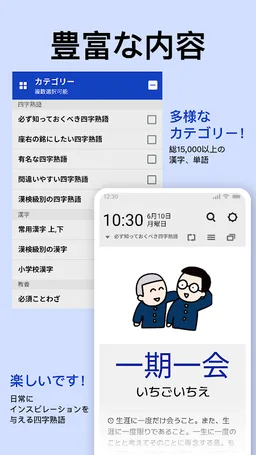
Provided with related images and detailed descriptions of sources and origins!
📘[Four-Character Idioms]
● Essential Four-Character Idioms
● Four-Character Idioms for Your Motto
● Famous Four-Character Idioms
● Commonly Used Kanji (Part 1 and Part 2)
● Kanji by Kanji Kentei Level
● Elementary School Kanji
📗[General Knowledge]
● Essential Proverbs
[Special Features of Lock Screen Kanji]
Kanji characters are automatically displayed on the lock screen like an alarm.
Just like an alarm sounds in your daily life, Lock Screen Kanji automatically reminds you to study.
Leave Lock Screen Kanji to easily learn kanji and rapidly acquire knowledge. 💙
🤦🏻♂️: If you have a solid grasp of kanji, there's nothing embarrassing about it!
But I wonder if I can find the time to study...
(It's actually a pain. Is there anyone who takes the time to study kanji when they're busy and tired from work?)
🙋🏻♀️: No problem!
With kanji on your lock screen, you can study automatically, even if you don't have time!
🙆🏻♀️: It's said that people look at their smartphones more than 100 times a day. Even if you just look at one kanji on your lock screen each time, you can learn 100 kanji in one day!
🙆🏻♂️: You don't have to open the app directly, just use your smartphone as you normally do!
💁🏻♀️: New kanji and their meanings are automatically displayed on your lock screen every time, so you can naturally learn new kanji just by looking at your phone.
You don't feel pressured to master them all at once, and as you build up each kanji you see, you'll become a kanji master before you know it!
Not only that, you can also see four-character idioms and proverbs on the lock screen, which will naturally improve your vocabulary!
🙋🏻♂️: I can't believe this amazing new technology is free to use! With Kanji Lock Screen, you can improve your education, vocabulary, reading comprehension, and confidence!
🙇🏻♂️: I need to go download it on Google Play right now!
💫Key Features
● Lock Screen Auto-Learning
● Auto-Review
● Study with Fun Quizzes
● Stroke Order Animations for Writing Kanji
● Word Categories: Favorites, Unsure, Learned
● Offline Dictionary Search
● Font Size Adjustment
💫Key Content
Provided with related images and detailed descriptions of sources and origins!
📘[Four-Character Idioms]
● Essential Four-Character Idioms
● Four-Character Idioms for Your Motto
● Famous Four-Character Idioms
● Commonly Used Kanji (Part 1 and Part 2)
● Kanji by Kanji Kentei Level
● Elementary School Kanji
📗[General Knowledge]
● Essential Proverbs
[Special Features of Lock Screen Kanji]
Kanji characters are automatically displayed on the lock screen like an alarm.
Just like an alarm sounds in your daily life, Lock Screen Kanji automatically reminds you to study.
Leave Lock Screen Kanji to easily learn kanji and rapidly acquire knowledge. 💙
Required features
- Camera android.hardware.camera
- Camera Any android.hardware.camera.any
- Faketouch android.hardware.faketouch
- Location android.hardware.location
- Screen Landscape android.hardware.screen.landscape
- Screen Portrait android.hardware.screen.portrait
- Wifi android.hardware.wifi
Permissions (38)
ロック画面漢字(漢字・四字熟語・ことわざの学習アラーム) requests the following Android permissions:
- Access Adservices Ad Id android.permission.ACCESS_ADSERVICES_AD_ID
- Access Adservices Attribution android.permission.ACCESS_ADSERVICES_ATTRIBUTION
- Access Adservices Topics android.permission.ACCESS_ADSERVICES_TOPICS
- Access Coarse Location android.permission.ACCESS_COARSE_LOCATION
- Access Fine Location android.permission.ACCESS_FINE_LOCATION
- Access Network State android.permission.ACCESS_NETWORK_STATE
- Access Wifi State android.permission.ACCESS_WIFI_STATE
- Camera android.permission.CAMERA
- Change Wifi State android.permission.CHANGE_WIFI_STATE
- Disable Keyguard android.permission.DISABLE_KEYGUARD
- Foreground Service android.permission.FOREGROUND_SERVICE
- Foreground Service Special Use android.permission.FOREGROUND_SERVICE_SPECIAL_USE
- Internet android.permission.INTERNET
- Post Notifications android.permission.POST_NOTIFICATIONS
- Read Basic Phone State android.permission.READ_BASIC_PHONE_STATE
- Read External Storage android.permission.READ_EXTERNAL_STORAGE
- Read Phone State android.permission.READ_PHONE_STATE
- Receive Boot Completed android.permission.RECEIVE_BOOT_COMPLETED
- Reorder Tasks android.permission.REORDER_TASKS
- Request Companion Start Foreground Services From Background android.permission.REQUEST_COMPANION_START_FOREGROUND_SERVICES_FROM_BACKGROUND
- Request Ignore Battery Optimizations android.permission.REQUEST_IGNORE_BATTERY_OPTIMIZATIONS
- System Alert Window android.permission.SYSTEM_ALERT_WINDOW
- System Overlay Window android.permission.SYSTEM_OVERLAY_WINDOW
- Use Full Screen Intent android.permission.USE_FULL_SCREEN_INTENT
- Vibrate android.permission.VIBRATE
- Wake Lock android.permission.WAKE_LOCK
- Write External Storage android.permission.WRITE_EXTERNAL_STORAGE
- Com Amazon Privacypass Attest com.amazon.privacypass.ATTEST
- Com Android Vending Check License com.android.vending.CHECK_LICENSE
- Com Coupang Mobile com.coupang.mobile
- Com Coupang Mobile Offsite com.coupang.mobile.offsite
- C2dm Permission Receive com.google.android.c2dm.permission.RECEIVE
- Finsky Permission Bind Get Install Referrer Service com.google.android.finsky.permission.BIND_GET_INSTALL_REFERRER_SERVICE
- Gms Permission Ad Id com.google.android.gms.permission.AD_ID
- Providers Gsf Permission Read Gservices com.google.android.providers.gsf.permission.READ_GSERVICES
- Com Huawei Permission External App Settings Use Component com.huawei.permission.external_app_settings.USE_COMPONENT
- Com Joymemory Kanji Dynamic Receiver Not Exported Permission com.joymemory.kanji.DYNAMIC_RECEIVER_NOT_EXPORTED_PERMISSION
- Read Phone Numbers READ_PHONE_NUMBERS