Colour Picker & Generator
Colour palette generator, Colour detector, Grab colour palette from Image
appsvek · com.appsvek.color_picker.rgb_color_detector.eyedropper






UpdatedMar 22, 2025
PublishedJun 14, 2024
Packagecom.appsvek.color_picker.rgb_color_detector.eyedropper
MD52681e24c982df7ccc4186c9f4402e864
SHA1 (signer)9F:FE:6E:41:FB:3E:90:67:EE:6B:88:6C:51:88:44:B5:55:8B:B0:76
Signed byCN=Android, OU=Android, O=Google Inc., L=Mountain View, ST=California, C=US
Architecturesx86, x86-64, armeabi-v7a, arm64-v8a
Malware scanTRUSTED
Contact[email protected]
Privacy policyView
What's new
- Create a palette from multiple images simultaneously.
- Lock colours in the palette generator.
- View the history of generated palettes.
- Lock colours in the palette generator.
- View the history of generated palettes.
Description
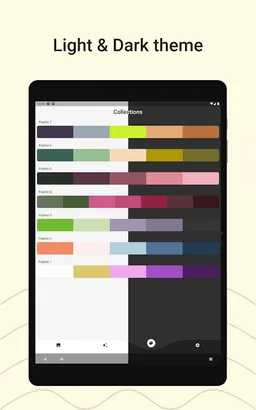
Colour Picker AR is a useful colour tool for designers, illustrators, and any artist working with colour palettes. The app helps to identify colour and colour code from the image, create a colour palette from an image, capture colour names for people with different colour blindness. A colour selector tool (eyedropper) allows you to select an exact colour of visual elements and match the brand colour theme.
COLOUR PICKER FROM IMAGE
Select the desired picture from your gallery and Find what colours are inside the photo. Colour Picker AR also has an auto colour identifier (colour scanner) feature that extracts the dominant coloors from the image and shows you colour swatches. Grab auto-generated colour swatches or Manually pick specific coloors from an image with the magnifier Eyedropper. The Eyedropper lets you pick any colour from the image. Get the hex code of any pixel in the image.
COLOUR PICKER CAMERA
Identify colours around you using the Camera colour detector! Capture and recognize colours simply by pointing the camera at the object. Create palettes from the colours you collect!
***Colour detection depends on the used Camera and current light conditions. All colours from a camera are provided for informational purposes only.
COLOUR PALETTE GENERATOR
Looking for inspiration? Have trouble finding colour palettes for your art project? Create a colour palette with ease. The application algorithm creates colour combinations based on colour theory and colour wheel harmony but adjusts colour values to make the palette more appealing. You can build a colour palette based on the added colour code as well – just type in the name of the colour (HEX code or RGB colour values) and the app generates a palette that complements this base colour.
COLOUR HARMONIES (COLOUR COMBINATIONS)
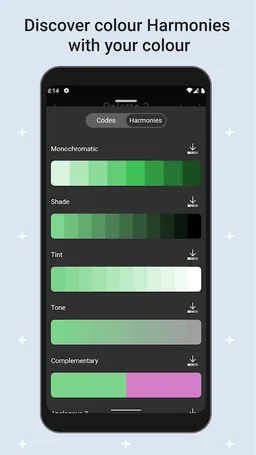
Discover different colour harmonies matching your particular colour. For each colour you collect, the app creates and generates harmonious schemes \ colour harmonies that go well with that colour. Grab a pre-defined colour palette and adjust colour values to your liking.
EDIT COLOURS
By clicking on the colour swatch you can easily customise the colour values (Hue, Saturation, Lightness) to your liking.
SHARE COLOURS
Easily Save, Share, Duplicate, Remove, and Edit already saved palettes. The app supports the most common colour models: RGB, HEX, LAB, HSV, HSL, CMYK, and more.
Are you colourblind, unable to distinguish certain colour hues, or simply want to know What colour is this? It is an app for identifying coloors for you!
Colour Picker AR is a helpful all-in-one colour tool for any artist that works with colour palettes and images – whether you’re creating visual graphics, painting digitally, designing logos or websites: create colour palette from image, use color palette generator. And if you have some problem with colour detection, the app will capture colour name and colour code for you.
COLOUR PICKER FROM IMAGE
Select the desired picture from your gallery and Find what colours are inside the photo. Colour Picker AR also has an auto colour identifier (colour scanner) feature that extracts the dominant coloors from the image and shows you colour swatches. Grab auto-generated colour swatches or Manually pick specific coloors from an image with the magnifier Eyedropper. The Eyedropper lets you pick any colour from the image. Get the hex code of any pixel in the image.
COLOUR PICKER CAMERA
Identify colours around you using the Camera colour detector! Capture and recognize colours simply by pointing the camera at the object. Create palettes from the colours you collect!
***Colour detection depends on the used Camera and current light conditions. All colours from a camera are provided for informational purposes only.
COLOUR PALETTE GENERATOR
Looking for inspiration? Have trouble finding colour palettes for your art project? Create a colour palette with ease. The application algorithm creates colour combinations based on colour theory and colour wheel harmony but adjusts colour values to make the palette more appealing. You can build a colour palette based on the added colour code as well – just type in the name of the colour (HEX code or RGB colour values) and the app generates a palette that complements this base colour.
COLOUR HARMONIES (COLOUR COMBINATIONS)
Discover different colour harmonies matching your particular colour. For each colour you collect, the app creates and generates harmonious schemes \ colour harmonies that go well with that colour. Grab a pre-defined colour palette and adjust colour values to your liking.
EDIT COLOURS
By clicking on the colour swatch you can easily customise the colour values (Hue, Saturation, Lightness) to your liking.
SHARE COLOURS
Easily Save, Share, Duplicate, Remove, and Edit already saved palettes. The app supports the most common colour models: RGB, HEX, LAB, HSV, HSL, CMYK, and more.
Are you colourblind, unable to distinguish certain colour hues, or simply want to know What colour is this? It is an app for identifying coloors for you!
Colour Picker AR is a helpful all-in-one colour tool for any artist that works with colour palettes and images – whether you’re creating visual graphics, painting digitally, designing logos or websites: create colour palette from image, use color palette generator. And if you have some problem with colour detection, the app will capture colour name and colour code for you.
Required features
- Camera android.hardware.camera
- Camera Any android.hardware.camera.any
- Faketouch android.hardware.faketouch
- Microphone android.hardware.microphone
- Screen Portrait android.hardware.screen.portrait
Permissions (15)
Colour Picker & Generator requests the following Android permissions:
- Access Adservices Ad Id android.permission.ACCESS_ADSERVICES_AD_ID
- Access Adservices Attribution android.permission.ACCESS_ADSERVICES_ATTRIBUTION
- Access Adservices Topics android.permission.ACCESS_ADSERVICES_TOPICS
- Access Network State android.permission.ACCESS_NETWORK_STATE
- Camera android.permission.CAMERA
- Foreground Service android.permission.FOREGROUND_SERVICE
- Internet android.permission.INTERNET
- Read External Storage android.permission.READ_EXTERNAL_STORAGE
- Record Audio android.permission.RECORD_AUDIO
- Vibrate android.permission.VIBRATE
- Wake Lock android.permission.WAKE_LOCK
- Com Android Vending Billing com.android.vending.BILLING
- Com Appsvek Color Picker Rgb Color Detector Eyedropper Dynamic Receiver Not Exported Permission com.appsvek.color_picker.rgb_color_detector.eyedropper.DYNAMIC_RECEIVER_NOT_EXPORTED_PERMISSION
- Finsky Permission Bind Get Install Referrer Service com.google.android.finsky.permission.BIND_GET_INSTALL_REFERRER_SERVICE
- Gms Permission Ad Id com.google.android.gms.permission.AD_ID