App Tiles - Launch Apps Faster
Add up to 6 app shortcuts in your notification area!
RADEFFFACTORY · com.radefffactory.apptiles



UpdatedJun 7, 2024
PublishedAug 3, 2021
Packagecom.radefffactory.apptiles
MD5b380724d46fc277d541301c944f663f7
SHA1 (signer)D1:F7:CC:5C:52:15:16:11:84:0E:CD:E2:DB:93:C5:F0:55:71:F9:0C
Signed byCN=Tihomir Radev
Malware scanTRUSTED
Contact[email protected]
Privacy policyView
What's new
- you can now launch websites from your tiles
- minor fixes
- minor fixes
Description
App Tiles is very useful app for optimizing app launching speed.
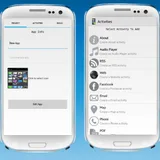
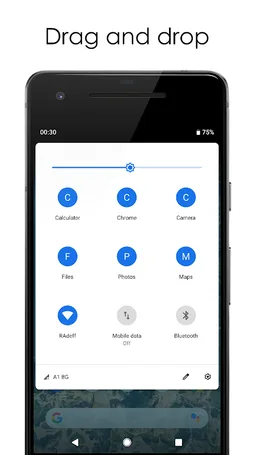
You can add up to 6 shortcuts for apps in your quick toggles area on the notification bar.
Or you can add up to 6 apps in just one tile in your quick toggles.
Just pick your apps, drag the tiles to the top of the list and they are ready to launch. You can click them in every app and at any time you want. Always be prepared with App Tiles!
Now you can add websites to your tiles!
A few tips:
If you find out that the quick tiles are not working after a few days then probably your device have an option to stop apps from working if they are not opened for a few days. Some of the latest Samsung phones have this option. To continue using the app you should add it to the battery exceptions list and allow it to work no matter if opened or not.
If you find out that after rebooting your device the quick tiles are not working you should allow the app to auto launch after reboot. Usually this is not necessary but on some Xiaomi and Huawei devices there's an option to block apps from auto launching and this prevents app from working after reboot.
There's ads in the app but they are showing only while you are setting up your favorite apps in the main app screen. When you are using the quick tiles you will never see ads from the app.
You can add up to 6 shortcuts for apps in your quick toggles area on the notification bar.
Or you can add up to 6 apps in just one tile in your quick toggles.
Just pick your apps, drag the tiles to the top of the list and they are ready to launch. You can click them in every app and at any time you want. Always be prepared with App Tiles!
Now you can add websites to your tiles!
A few tips:
If you find out that the quick tiles are not working after a few days then probably your device have an option to stop apps from working if they are not opened for a few days. Some of the latest Samsung phones have this option. To continue using the app you should add it to the battery exceptions list and allow it to work no matter if opened or not.
If you find out that after rebooting your device the quick tiles are not working you should allow the app to auto launch after reboot. Usually this is not necessary but on some Xiaomi and Huawei devices there's an option to block apps from auto launching and this prevents app from working after reboot.
There's ads in the app but they are showing only while you are setting up your favorite apps in the main app screen. When you are using the quick tiles you will never see ads from the app.
Required features
- Faketouch android.hardware.faketouch
Permissions (10)
App Tiles - Launch Apps Faster requests the following Android permissions:
- Access Adservices Ad Id android.permission.ACCESS_ADSERVICES_AD_ID
- Access Adservices Attribution android.permission.ACCESS_ADSERVICES_ATTRIBUTION
- Access Adservices Topics android.permission.ACCESS_ADSERVICES_TOPICS
- Access Network State android.permission.ACCESS_NETWORK_STATE
- Foreground Service android.permission.FOREGROUND_SERVICE
- Internet android.permission.INTERNET
- Query All Packages android.permission.QUERY_ALL_PACKAGES
- Wake Lock android.permission.WAKE_LOCK
- Gms Permission Ad Id com.google.android.gms.permission.AD_ID
- Com Radefffactory Apptiles Dynamic Receiver Not Exported Permission com.radefffactory.apptiles.DYNAMIC_RECEIVER_NOT_EXPORTED_PERMISSION